
Click and drag save an Avid effect for later use


Quicktip #23 (February 23, 2009) Saving a Custom Avid Effect
If you have an applied effect that you have perfected in Avid and you want to save that to use on other clips, first open the Effect Editor and then grab the effect icon in the effect editor:
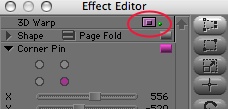
Click and drag the icon into a bin to save it:
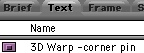
You can custom name the effect and then apply it like you would any effect from the Effects Palette.
Support ProVideo Coalition
Shop with


Filmtools
Filmmakers go-to destination for pre-production, production & post production equipment!
Shop Now