(Page 1 of 1 pages for this article )

Friday, February 27, 2009

Filed under: EditingPost ProductionTips

Quicktip Day 27: Promote to Avid Advanced Keyframes

Scott Simmons | 02/27

Promoting certain Avid effects opens a timeline with lots of possibilities

image

Quicktip #27 (February 27, 2009) Promote to Avid Advanced Keyframes

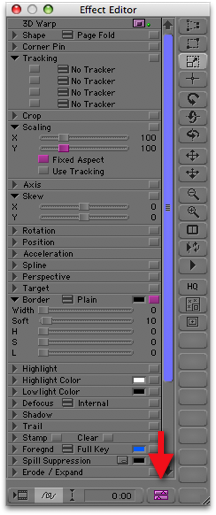
In the old days, to keyframe Avid effects you had to open the effect in the Effect Editor and add keyframes in the Record monitor. This could quickly become confusing with lots of keyframes added to different parameters. Recent releases of Avid Media Composer will allow you to promote a number of effects to Advanced Keyframes. Just look for the promote to advanced keyframes button in the corner of the Effect Editor:
image

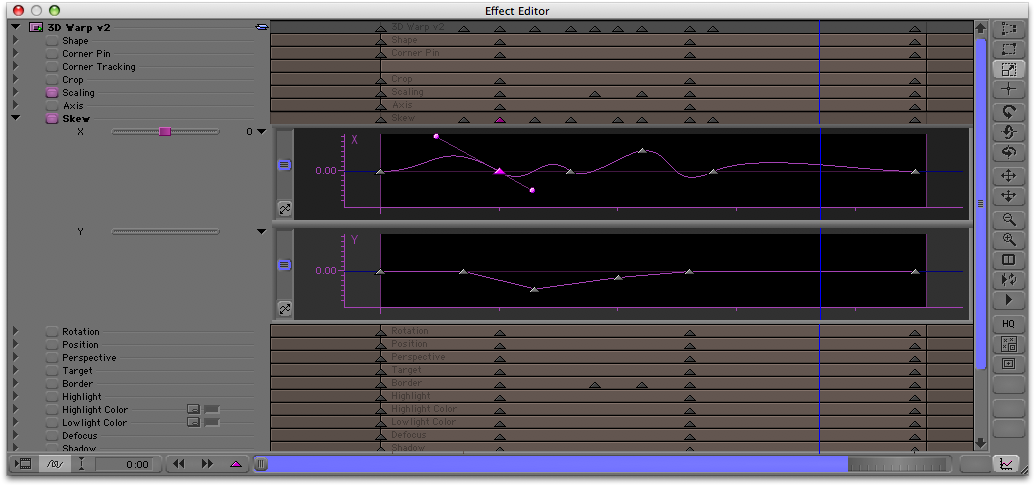
Clicking this button will open up the keyframe editor that has a timeline for each parameter in the effect. The image below shows the ever useful 3D Warp:
image

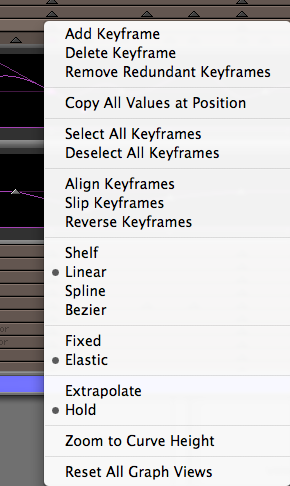
With the advanced keyframe editor open you can turn on different effect parameters and twirl down the disclose triangle and see animation curves that will be familiar to anyone who has done animation keyframing via curves before. Right+click (or control+shift+click on a single button mouse) on a curve and there are many more options for working with the curves and their keyframes.

image

(Page 1 of 1 pages for this article )

                    Clip to Evernote


You must be registered to comment. This is an effort to reduce spam. Please REGISTER HERE.

Name:

Email:

Location:

URL:

Smileys

Remember my personal information

Notify me of follow-up comments?

Submit the word you see below:


My lengthy Adobe Premiere Pro CS6 review now online
Final Cut Pro X Multicam Editing webinar now available on-demand
10 Final Cut Pro things FCP editors might be missing in Adobe Premiere Pro CS6
A collection of Avid Media Composer related links for my NAB Migrating to Avid class
An elegant iPhone timecode calculator
Random notes from my first “real world” Adobe Premiere Pro CS6 edit
NAB 2012: SpectraCal
NAB 2012: Apple and Final Cut Pro X
NAB 2012: Lightworks
NAB 2012: Baselight for Avid Media Composer
NAB 2012: Quantel new Pablo and Neo Nano
NAB 2012: Promise Technology’s portable Thunderbolt J4 and J2
NAB 2012: NewBlueFX Titler Pro
NAB 2012: PluralEyes 3.0 from Singular Software
NAB 2012: Technicolor CineLights from the GoPro booth
Autodesk Smoke 2013: it really changed for the better
My top 5 (or so) Adobe Premiere Pro CS6 features
How to preview Avid Media Composer’s MXF files for free without Media Composer
My NAB 2012 Post|Production World classes
Baselight for Final Cut Pro is one of the most powerful legacy FCP grading plugins ever
ARRI’s DNxHD Alexa update, Sorenson Squeeze Pro and OP this, OP that
What’s happening at NAB 2012?
The C300 short Hustle and some before and after images
Tip Tuesday: Disable a clip in the Avid Media Composer timeline
Testing the 7toX Final Cut Pro 7 to Final Cut Pro X conversion
Q and A with Bunim/Murray’s Mark Raudonis about their recent Avid switch
Kicking the tires on the Final Cut Pro X 10.0.3 Multicam update
Update Alert: Final Cut Pro X goes to 10.0.3
Adobe teases Prelude at the San Francisco Supermeet, FCPUG changes its name
Tangent Element panels are now shipping


To be considered for listing, contact pr (at) provideocoalition (dot) com


Copyright © 2012, HD Expo, LLC a division of Diversified Business Communications. DBA Createasphere

All rights reserved. HD EXPO, High Def EXPO, Createasphere, E-Tech, Entertainment Technology Exposition, 3D Production Workshop, VariCamp, P2 Camp, ColorCamp 101, and Lighting, Filters & Gels for HD are all trademarks of HD Expo, LLC.

Terms of Use  |  Privacy Policy

Check PageRank