
(Page 1 of 1 pages for this article )

Wednesday, February 16, 2011

Filed under: AppleEditingGentryMedia Sister SitesMac CoalitionProVideo CoalitionPost ProductionSoftwareTipsVendor ChannelsAvid

Quicktips 2011 Day 16: Restore Default Patch in Avid Media Composer

Scott Simmons | 02/16

February 16, 2011 - This Reader Quicktip is a one click option when editing from a sequence in the Source monitor

This Reader Quicktip comes from Josh Petok. If you’re an Avid Media Composer editor then you know you can load a sequence into the Source monitor and edit that into another timeline (which you can do in Final Cut Pro too but this is an Avid tip). If you’ve ever noticed the totally mixed up video and audio patches that happen after that then read on for an easy fix.

Here’s what Jack says:

Here’s a REALLY quick one for Avid editors. How many times have you tried to cut a sequence into another sequence and your source tracks look like this? (cue the “You’re doing it wrong” video http://www.youtube.com/watch?v=08xQLGWTSag )
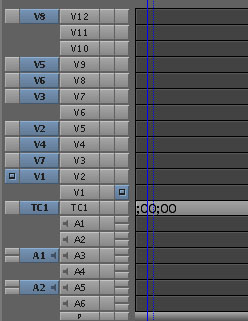
image

Many editors do not know that you can easily re-patch all the tracks with one simple command. Under “special” there is a command called “Restore Default Patch” which is mappable to any of your keys.
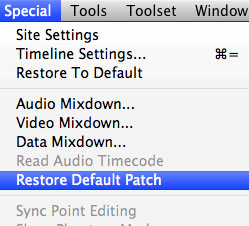
image

This command will re-organize all your tracks to look like this.
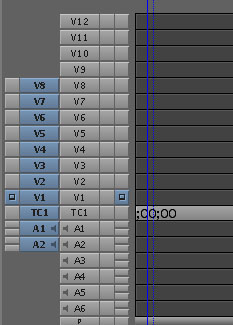
image

That’s a good tip to be reminded of as restoring that default patch by clicking and dragging in the Media Composer timeline patch bay can be a real pain if you have a lot of video and/or audio layers. Thanks to Josh for the tip. You can check out Josh’s reel or his blog The Current Cut.

And for a good laugh here’s that You Tube video he linked to:


(Page 1 of 1 pages for this article )

                    Clip to Evernote


The Editing of “Courageous” Part One

Steve Hullfish | 10/14

The off-line edit of a RED feature film

image

Last October, I had the rare opportunity to edit a feature film called “Courageous,” which is in theaters now. “Courageous” was the number one new movie the weekend it opened (September…

The Best of Stunning Good Looks

Art Adams | 08/30

A directory of my best articles, sorted by topic.

This entry is a guide to my best articles, sorted by topic. Enjoy!

Final Cut Pro X Multicam Editing webinar now available on-demand

Scott Simmons | 05/15

Plus a little screencast in this blog post on a topic we didn’t get to cover.

image

I had great fun last week presenting the Final Cut Pro X multicam editing webinar…


You must be registered to comment. This is an effort to reduce spam. Please REGISTER HERE.

Name:

Email:

Location:

URL:

Smileys

Remember my personal information

Notify me of follow-up comments?

Submit the word you see below:


Final Cut Pro X Multicam Editing webinar now available on-demand
10 Final Cut Pro things FCP editors might be missing in Adobe Premiere Pro CS6
A collection of Avid Media Composer related links for my NAB Migrating to Avid class
An elegant iPhone timecode calculator
Random notes from my first “real world” Adobe Premiere Pro CS6 edit
NAB 2012: SpectraCal
NAB 2012: Apple and Final Cut Pro X
NAB 2012: Lightworks
NAB 2012: Baselight for Avid Media Composer
NAB 2012: Quantel new Pablo and Neo Nano
NAB 2012: Promise Technology’s portable Thunderbolt J4 and J2
NAB 2012: NewBlueFX Titler Pro
NAB 2012: PluralEyes 3.0 from Singular Software
NAB 2012: Technicolor CineLights from the GoPro booth
Autodesk Smoke 2013: it really changed for the better
My top 5 (or so) Adobe Premiere Pro CS6 features
How to preview Avid Media Composer’s MXF files for free without Media Composer
My NAB 2012 Post|Production World classes
Baselight for Final Cut Pro is one of the most powerful legacy FCP grading plugins ever
ARRI’s DNxHD Alexa update, Sorenson Squeeze Pro and OP this, OP that
What’s happening at NAB 2012?
The C300 short Hustle and some before and after images
Tip Tuesday: Disable a clip in the Avid Media Composer timeline
Testing the 7toX Final Cut Pro 7 to Final Cut Pro X conversion
Q and A with Bunim/Murray’s Mark Raudonis about their recent Avid switch
Kicking the tires on the Final Cut Pro X 10.0.3 Multicam update
Update Alert: Final Cut Pro X goes to 10.0.3
Adobe teases Prelude at the San Francisco Supermeet, FCPUG changes its name
Tangent Element panels are now shipping
Avid Media Composer 6 review online


The Editing of “Courageous” Part One

Steve Hullfish | 10/14

The off-line edit of a RED feature film

image

Last October, I had the rare opportunity to edit a feature film called “Courageous,” which is in theaters now. “Courageous” was the number one new movie the weekend it opened (September…

The Best of Stunning Good Looks

Art Adams | 08/30

A directory of my best articles, sorted by topic.

This entry is a guide to my best articles, sorted by topic. Enjoy!

Final Cut Pro X Multicam Editing webinar now available on-demand

Scott Simmons | 05/15

Plus a little screencast in this blog post on a topic we didn’t get to cover.

image

I had great fun last week presenting the Final Cut Pro X multicam editing webinar…

Editing and Effects Together in One Editor Part 2

Brian Mulligan | 05/15

The NLE revolution isn’t over… Enter Autodesk Smoke for Mac

image

Editing & Effects All-In-One
Autodesk has always been known for the strength of their effects and image processing tools. The tools in Smoke have been used in everything…

To be considered for listing, contact pr (at) provideocoalition (dot) com


Copyright © 2012, HD Expo, LLC a division of Diversified Business Communications. DBA Createasphere

All rights reserved. HD EXPO, High Def EXPO, Createasphere, E-Tech, Entertainment Technology Exposition, 3D Production Workshop, VariCamp, P2 Camp, ColorCamp 101, and Lighting, Filters & Gels for HD are all trademarks of HD Expo, LLC.

Terms of Use  |  Privacy Policy

Check PageRank