
February 23, 2011 – If you’ve keyframed a shot in FCP you can move all the keyframes at once in the FCP timeline

This reader Quicktip comes over from Steve Sabban and it’s a follow-up to Quicktip number 7: changing FCP filters lengths partially applied to a clip. I thought that was a particularly handy tip but it didn’t go into any real timeline manipulation of keyframes. This tip does.
If you’ve keyframed filter parameters or motion parameters on a Final Cut Pro clip then you can move those keyframes earlier or later in time by clicking the Toggle Clip Keyframes button in the lower left corner of the timeline. Then right + click on the button to turn on and off specific values to be shown (this saves valuable timeline real estate):
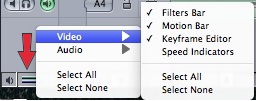
You’ll find you can turn on keyframe indicators for both video and audio as well as indicators for filter and motion keyframes and speed changes. If you have keyframed any values then keyframe indicator marks will appear:
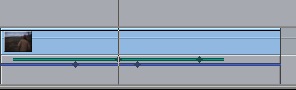
In the above image the green line is the filter indicator and the blue line is the motion indicator. If you want to move those keyframes together just click on either indicator bar and you can slip the keyframes left and right as indicated in Steve’s video:
You can also move individual keyframes by clicking on a keyframe and moving it. It’s a very useful way to manipulate keyframes right in the timeline. And you’re correct if you see there’s no mention of the timeline Keyframe Editor. That’s Quicktip comes later.
Thanks to Steve for sending over that screen capture to illustrate. You can follow him on Twitter @SteveSebban.
His company KPL Production Services has also been nice enough to throw in a couple of licenses for their iOS timecode calculators for both iPhone and iPad as part of the giveaway to the best Reader Quicktip from our 28 Days of Quicktips that we’re running during February. Time is running out so get all the details right here and submit your own Quicktip.


Filmtools
Filmmakers go-to destination for pre-production, production & post production equipment!
Shop Now








