
February 26, 2011 – Putting a zero in front of single digit numbers sorts them properly


Today’s Quicktip almost seems like a no-brainer but I’m surprised that I still see projects come in the door where items have been numbered in a bin 1, 2, 3 — 10, 11, 12 instead of 01, 02, 03 — 10, 11, 12. Why add the zero? So when you sort the items by name in the bin they are sorted properly.
Again, this is the most basic tip but I still see projects where the editor doesn’t use the zero in front of single digits. It would drive me crazy to have to always look at the bottom of a list of items for a certain number.
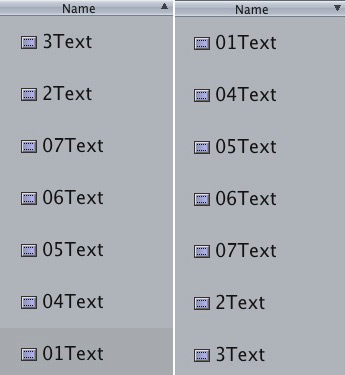
A Final Cut Pro bin sorted in both ascending and descending order.
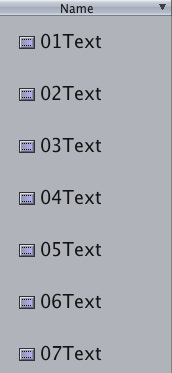
See how in the image above number 2 and 3 text items aren’t sorted in the proper order? If they had a zero in front of the number they would sort properly:
Avid, on the other hand, seems to interpret what an editor might actually want and will sort clips in the proper order regardless of the inclusion of a zero or not:
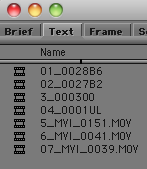
I still use a zero in Avid as well just to stay consistent. A very simple tip but one that will help keep an editor sane.


Filmtools
Filmmakers go-to destination for pre-production, production & post production equipment!
Shop Now