

Filmtools
Filmmakers go-to destination for pre-production, production & post production equipment!
Shop NowThis new version of the old favorite Colorista packs quite a punch, makes Apple Color tremble in its boots

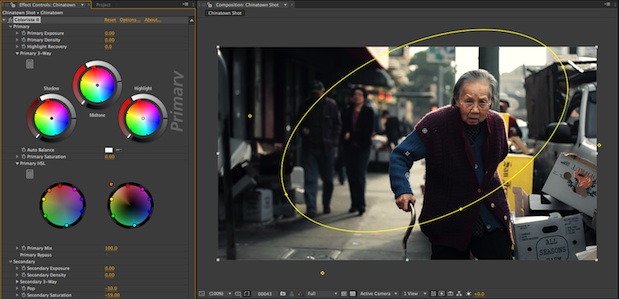
Colorista. It’s one of those indispensable tools for those doing serious Final Cut Pro work. If you’re color correcting and finishing in your FCP box then the built-in 3-Way Color Corrector becomes merely adequate in comparison to the image quality you can crank out of Colorista. And Colorista has always worked in your other host applications as well (Adobe Premiere Pro, After Effects, Avid Media Composer) so that rounds out its usefulness. But one thing that has always been missing from Colorista is secondaries, something you’d often find yourself wishing for. With Magic Bullet Colorista II, from Red Giant Software, that wish has been answered … in a big way.
Colorista version 1, while a quality color correction tool, was just one instance of the grader with the option to apply a mask via the Power Mask controls. Colorista II, full of features, is basically three copies of the tool in one. There’s Primary, Secondary and Master controls built in each time you apply the effect. Each control has subtle differences depending on the control like Secondary having a keyer and Master having curves control. This new 3-tiered Colorista is a bit like Apple’s Color in that regard. Color uses the “rooms” metaphor with Primary In, Secondaries and Primary Out as it’s three main working rooms. You don’t have Geometry controls in Colorista II since you make your geometry changes right in your chosen host application. In many situations Colorista II is going to give Color a run for its money.
And what about Apple Color?
I mention Apple Color as this seems like it might be a common question: Can Colorista II replace Apple Color for full color correction work? I think the short answer is yes, in many places it can and it’s especially easy to use Colorista II instead of Color if Final Cut Pro is your host application. It’s much easier to toss Colorista II on a few shots and get a good secondary key correction without the hassle of moving back and forth to Color. Of course there’s still certain advantages that moving to a dedicated application like Color will give you; most notably a hardware control surface, which is still a very valuable tool for serious grading. But according to Stu Maschwitz, Red Giant Software’s Creative Director, creator of all things Magic Bullet and everyone’s favorite color grading advocate, “we are obsessed with creating some kind of control-surface experience for the majority if #CII users.” This came out of one of the many tweets that Stu has been teasing the post-production community with for the last couple of days. Some type of surface would up Colorista’s standing quite a few notches.
In the week or so I’ve been testing out Colorista II I had one specific instance where I needed to make a rather difficult secondary correction. The normal process would have been to drop the shot into its own FCP sequence, send the single shot to Color, grade, render a new ProRes file and roundtrip back to FCP. Colorista II and the amazing new secondary keyer handled the correction like a champ. Sure there’s those instances when a client might be around that it feels more impressive to move into a dedicated color correction tool like Apple Color but when I’m working unsupervised on a deadline I want to hit the sweet spot between the quality tool and the efficient workflow. Colorista II appears to hit that sweet spot nicely.
Lots of new controls
Colorista II is pretty much a re-think of the entire product. Thankfully you will still see the familiar color wheels upon applying the plug-in so you can go to work quickly. But upon closer inspection (you’ll have to scroll down through all of the different controls as there’s too many to fit on one screen) you’ll see a lot more control. And I mean a lot more control.
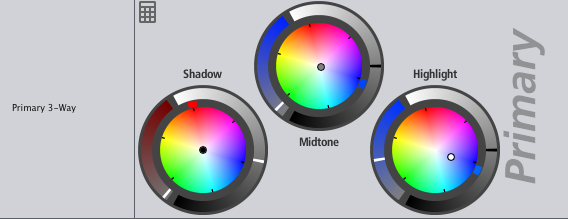
You might first notice that there are some new little tic marks around the familiar color wheels. While you can still click and drag in the same spots as old there’s a new tic mark that is an easy way to adjust the hue. Spin that around the circle and the color wheel dot follows. You can also grab a new saturation slider that’s been added to the color wheel to adjust the saturation of whatever color has been chosen in a particular wheel. A double click on a control resets the parameters. More fine correction details can be achieved when you click the new calculator icon:
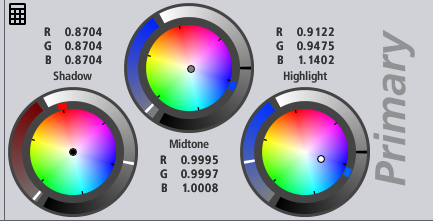
This opens numeric RGB controls for tweaking of specific color channels. Don’t be frightened off thinking you have to type in numbers via this new control as you can scrub with the mouse to raise or lower values. I love this new addition as I often find myself using the Advanced tab of the Primary In room in Apple Color to adjust individual RGB lift/gamma/gain, especially to balance the color of an image, so I’m sure I’ll find myself doing the same with these new controls in Colorista.
The other big control addition you’ll see upon first scanning Colorista II will be the HSL wheels. It’s quite genius in concept and simple in execution. The ring around the outside of the wheels contain tiny colored dots (they include red, orange, yellow, green, cyan, blue, purple and magenta). Drag them either closer to or further away from the center to change the saturation and lightness. Drag them around the circle to change the hue. It’s a new and different way of thinking about manipulating color from what was available in Colorista 1 and it works well. And it’s quite a visual way of working and by visual I don’t mean just seeing the results in your image but also seeing what you are doing in the tool itself.
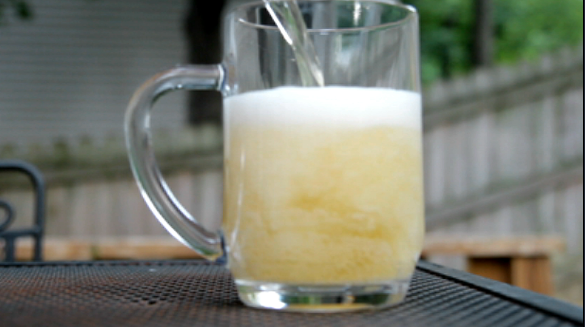
My before frame, I want to remove all color from the beer in the glass.
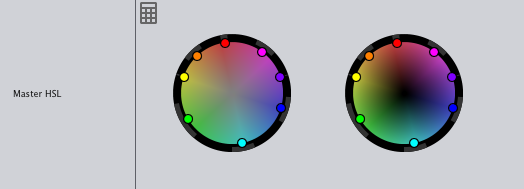
The HSL controls before adjustment.
I used a Power Mask in the Master control of Colorista II to target my correction only to the beer in the glass.
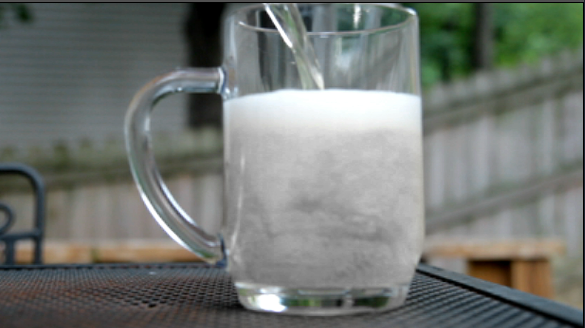
The image after removing all color from the beer.
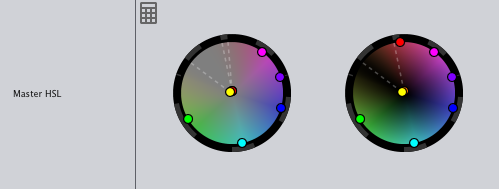
You can see the HSL controls and how the colors of the control itself changes to reflect the correction.
Of course I could have chosen to turn down the saturation to achieve the same result but I wanted to show a good example of what the HSL sliders will do as you make corrections using them. I think a new control like this might get me experimenting in a way that I wouldn’t have done before. Experimenting in a grading session often leads to some fun discoveries so I’m excited to work with these new controls.
Next Up: Secondaries and What’s Missing
The biggest addition – Secondaries
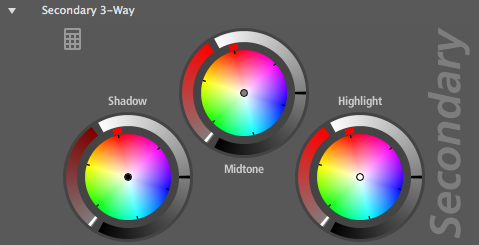
With Colorista II we get the addition of secondaries, a must have for the serious color grading session. This new feature alone raises the bar of Colorista II from what was just a great color correction plug-in to a tool for more serious grading sessions.
The idea of secondaries is this: you have to be able to grab specific colors within an image and change only those values, not the entire frame. Secondaries can be handled by masks and windows and we’ve had that ability in Colorista all along via the Power Mask. That Power Mask is still there. But the most powerful Secondary tools will allow the colorist to pull mattes based on hues and luminance information within the frame. If you’ve got five people wearing five red shirts all placed around the frame then five windows just aren’t always going to cut it.
Colorista II introduces its own unique keyer to pull mattes for secondary corrections. The way the keyer works is almost like the programmers actually talked to editors and colorists and listened when they said they wanted a simple and intuitive way to make a secondary mask while looking at a frame. Of course that’s exactly what they did as Colorista’s creator Stu Maschwitz was instrumental in this update and has been soliciting Colorista upgrade suggestions via Twitter for a while now. It was a novel idea: Ask users what they want to see in this new version and then implement those ideas. One of those things was “the ability to ‘grab’ any color and manipulate it easily.”
It’s quite simple: you open the keyer interface while parked on your chosen frame, grab the marquee selection tool to click and drag around the color you want to change. Refinement can be made by selecting the + and – tools and scrubbing around the colors of in the image to either add to or subtract from the mask. There’s three displays to view the image (source, matte and result windows) as well as a couple of color graphs to show your selection.
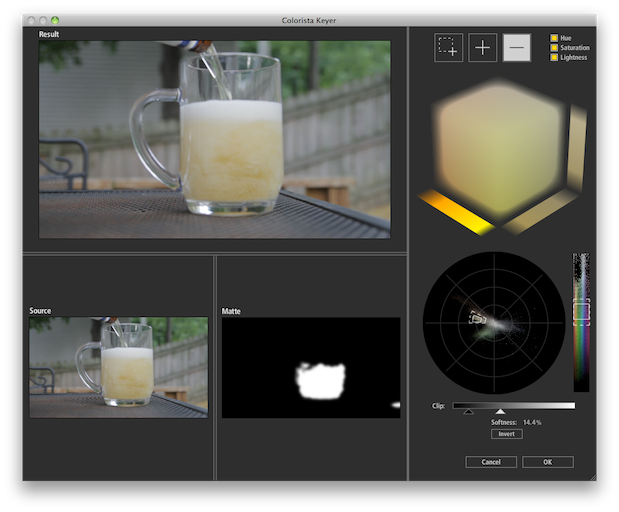
You’ll grow to love the Colorista II keyer.
Special attention should be given to the cube color display which can be manipulated itself in a 3D kind-of-way to help refine the selection. At any point you can toggle hue, saturation and lightness. While the cube is cool you’ll probably find yourself using the marquee selection and the + and – tools while working directly in the frame to make selections. Add to these controls the clipping and softness sliders and you’ve got quite a powerful way to make secondary matte selections. This alone is worth the price of admission and probably justifies the $100 price increase over Colorista 1.
Other stuff
There’s quite a lot of other parameters that have been added like Highlight Recovery and an Auto Balance option in the Primary. The Master includes a Master Curves tool though you operate it with sliders and not directly on the curves. The Secondary has a Pop slider that, with a name like Pop, begs to be played with. You can change the way the masks (Secondary and Master have masks) interact with each other for some very advanced corrections. And each correction can be individually bypassed.
There’s also an Options section:
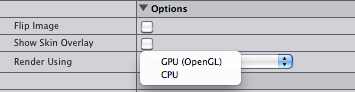
Here you’ll find a toggle to flip the image (a nice touch for those few without a Canon DSLR who are using a 35mm lens adapter) and Show Skin Overlay which takes an idea from Magic Bullet Mojo and adds a grid help achieve proper skin tones (this is one thing I haven’t tired out yet).
Colorista II also has the option to render using your GPU which will come in handy if you have a beefy video card. You’re certainly not going to see realtime playback in Final Cut Pro so all output will have to be rendered. I was most excited to see Colorista II’s performance in Premiere Pro CS5. Under Adobe’s Mercury Playback engine I was able to get full frame, realtime playback of corrections applied to native Canon H.264 files even without GPU acceleration. That Mercury Playback Engine is nothing short of amazing.
And Red Giant Software has seen fit to add installers for Final Cut Pro, After Effects and Premiere Pro all in the one package, like they do for many of their products, not making you pay extra for different applications. It’s the little things like that that make a difference.
What’s missing
Not really much.
Colorista II doesn’t have a built-in tracker to track corrections and move then across the frame. Sure that would be a nice addition but it’s still a very feature rich upgrade. And besides, there’s got to be something to attract buyers to the upcoming $1,000 DaVinci Resolve right? (The tracker in that thing looks amazing.) It might be nice to save complex corrections directly within the interface but you can always just save your correction to a favorite effects bin for reuse.
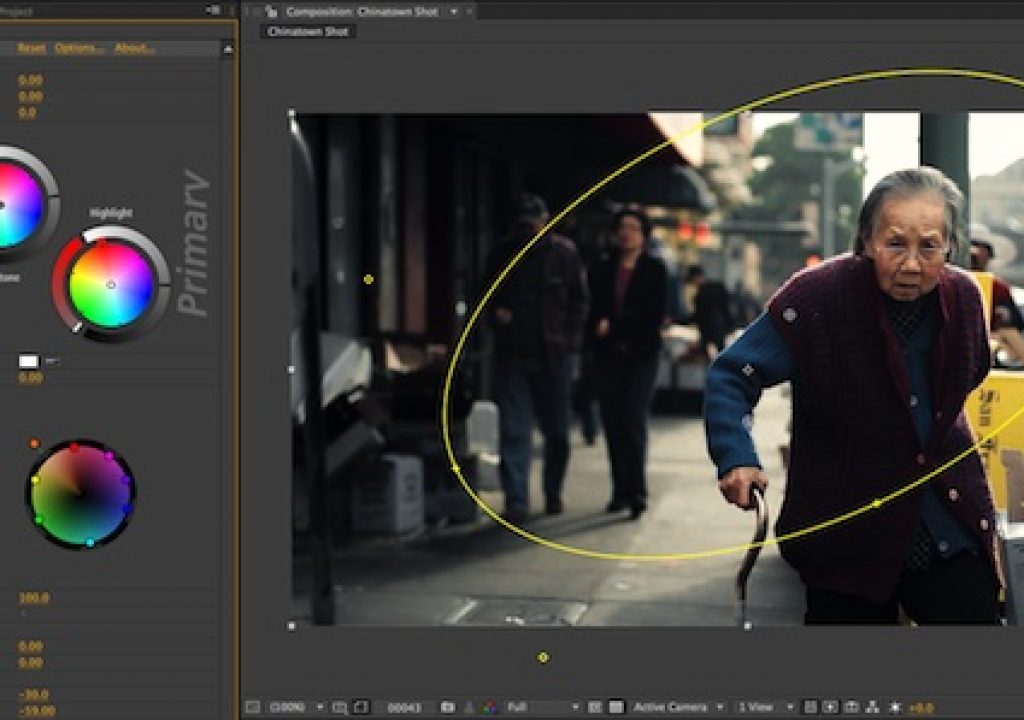
In many of the demo images you see of Colorista II there’s an outline of the Power Mask window. Those images are from After Effects as the Power Mask outline option doesn’t exist in Final Cut Pro or Premiere Pro due to limitations in those applications. In FCP you’ll have to turn on an overlay or look at the mask as you set up the Power Mask feature.
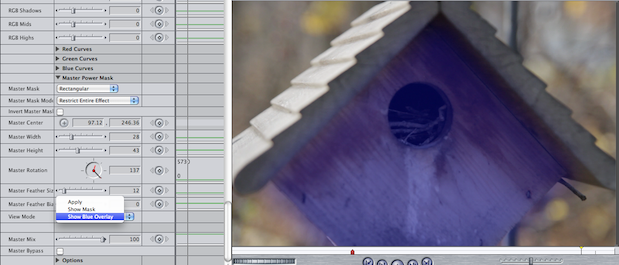
Above is the Power Mask in the Master control, the overlay is blue in color.
I think the really big thing missing from this new version of Colorista II is support for Avid’s Media Composer. Colorista 1 did support Avid but according to the Colorista II press kit “Motion and Avid AVX support will be added in a future update” and it says just that on the Colorista II features page FAQ page. Now I’m sure Red Giant Software does market research, knows their target audience and where that audience is working with Red Giant tools. I’m not sure how easy or difficult it might be to port Colorista II over to Avid’s AVX plug-in architecture but it’s probably not just the push of a button or they would be supporting Media Composer upon release. In fact some of that July 20 Twitter discussion points to the possibility that it’s Avid’s plug-in architecture that won’t allow for some of the custom interface things that Colorista II has going on.
My hope is that they do bring it over in some shape, form or fashion as it would be a FANTASTIC addition to the newly released Media Composer 5.0. This big 5.0 Avid update seems to be making in-roads that Avid hasn’t made in quite some time so the market potential could be there. While Media Composer has a nice color corrector built-in (including directly manipulatable curves) it doesn’t include secondaries. And after using the both, quite frankly, Colorista II is a much better interface in which to work.
I would also hope that Avid itself might work directly with Red Giant Software to get Colorista II onto Media Composer as it jives with the company’s new openness policy and the availability of such third part plug-ins can only help with the overall adoption of Media Composer. Couple that with Avid’s recent acquisition of Euphonix and their MC Color control surface and the Avid user’s head might spin as what could be an amazingly powerful combination if implemented properly.
And talk of Euphonix and the MC Color brings up the discussion of control surfaces in general. Serious grading benefits in so many ways from a dedicated hardware control surface. If there was some way to control Colorista II via a Tangent Wave or MC Color unit then it instantly becomes an even more useable tool. You’d already have a hardware card from external monitoring. Even the new HSL controls are designed around a wheel so it seems like you’d be able to control them with the trackballs if the software was tweaked just right.
I might be dreaming a bit too big here though as the nature of applications like FCP, After Effects and Premiere Pro are mouse click driven but it’s okay to dream. Especially in light of Stu’s comment I mentioned earlier about their obsession to create some kind of “control surface experience.” One dream that has been discussed (and will be discussed more with this Colorista II release) is using an iPad as some type of control surface. I’ve been using the Air Display app with my desktop and iPad for a couple of months now trying something similar as I drag various windows onto the iPad and try to control certain functions of an application on the touch screen. It’s certainly a crude way of doing things and nothing like what could be possible when you’ve got smart engineers trying to tackle a specific problem but my Air Display tests have thus far resulted in a resounding …. meh. That’s probably more because Air Display is just a workaround and not dedicated to a specific task. I can tell you an iPad control surface will be no Wave or no MC Color. But it also won’t cost $1,500. I look forward to this idea and hope that it can be implemented in a smart and useful manner.
Wrap
In the meantime, if you’re a fan of Colorista 1 then you’ll definitely want to spend the very reasonable $99 to upgrade to Colorista II. If you’re new to the game entirely then the $299 purchase price is well worth it as this is a full featured color grading tool that is leaps and bounds better than its predecessor (which was already a good tool) and leaps and bounds better than a lot of competitors. Two standouts of the new release are the HSL controls and the Secondary keyer so if you’re on the fence about an update grab the demo and check out the entire tool. While there’s no control surface support you can always grab a Kensington Trackball and give the poor man’s control surface a whirl. If you have to accomplish good color correction in your host application then I don’t think there’s currently a better tool than Colorista II.
Pros: Great image quality, lots of new controls over its predecessor, a world class Secondary keyer that’s easy to use
Cons: No Avid Media Composer support (or Apple Motion or Sony Vegas), no motion tracking
Wish List: As with any added effect, realtime playback would be one of the best features to ever add though it might not be possible with certain host application’s architecture; a hardware control surface of some kind
I’d buy Colorista II and move it to the top of the food chain for serious color grading. Since it allows you to stay in the host application (I’m specifically thinking about Final Cut Pro for most of my use thought I’m using Premiere Pro CS5 more and more) a lot of time can be saved instead round-tripping to and from Color. And with the Secondary keyer many complex grading tasks can easily be accomplished with Colorista II.