
(Page 1 of 1 pages for this article )

Friday, January 27, 2012

Filed under: AppleFinal Cut ProEditingGentryMedia Sister SitesMac CoalitionProVideo CoalitionHardwarePost ProductionSoftware

Tangent Element panels are now shipping

Scott Simmons | 01/27

DaVinci Resolve isn’t listed as being supported as of yet. Hopefully soon.

image

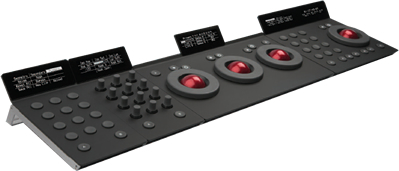
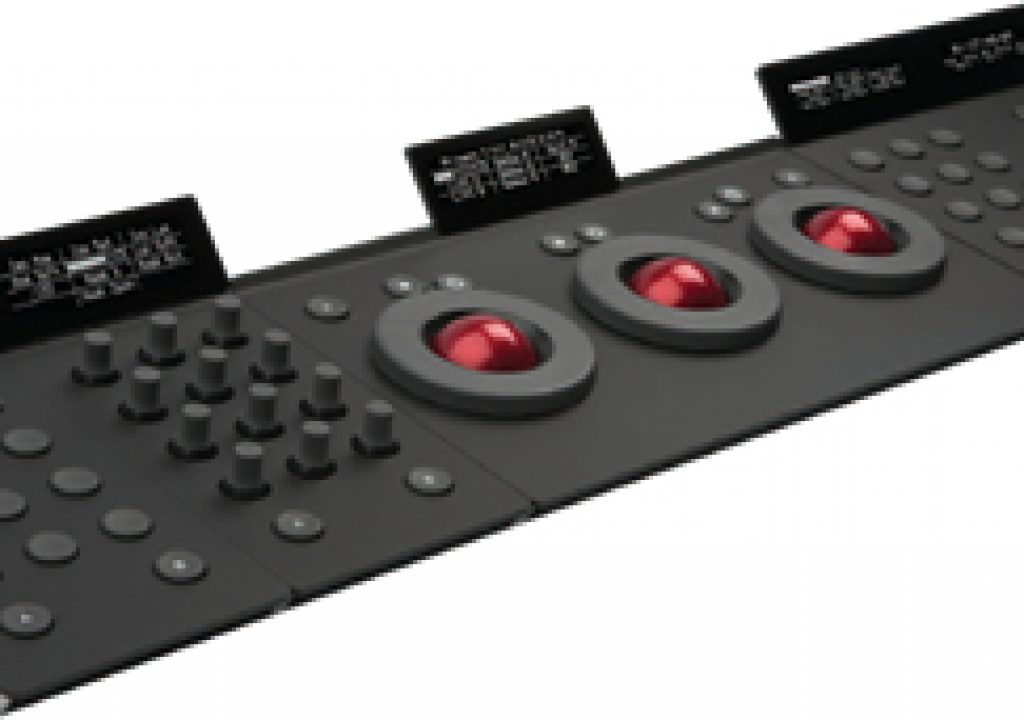
Word came out today from Tangent Devices that the first Element panels are now shipping. If you don’t remember the Element is Tangent’s newest color grading control panel that uses a modular design that is four separate pieces that can be purchased separately. They are designed to work together to make a more full featured panel than the Wave with trackballs and rings, knobs and buttons and transport controls if the buyer so desires. As for supported applications, Assimilate SCRATCH and Apple Color are two more common applications on the list but the one many people are asking about, DaVinci Resolve, is (so far) missing.

What applications are listed? As for released support, that includes: Assimilate SCRATCH, Colorfront On-Set Dailies, YoYotta YoYo. Upcoming support: Apple Color, Cintel FLOW & COLORFLOW, DFT FLEXXITY, Marquise OCEAN, RAIN & MIST, Pixel Farm PF Clean and SGO Mistika. Some of those are very specialized tools.

The conspiracy theorist might say that Blackmagic Design might not ever support the Element as the panel looks so cool the colorist might not need to purchase the full (and much more expensive) DaVinci panel but the truth is that BMD has to build the support in themselves so it will take an update to Resolve to get any new hardware support. As cool as the Element looks the big Resolve panel is tailor made for the speed and efficiency when using the software and the Element has been designed to support multiple applications. That means the Resolve panel will have advantages over the Element.

That said the Element looks like it will be fun to use. A check of the main Element page will show the four different pieces that make up the whole unit. This little YouTube video is a 7-second piece that gives a little bit of an idea of what the Element is like. This is a pre-production unit I’m sure so the final version might vary.

I like the idea that you’ll be able to buy just the trackball unit as I bet that will be a popular purchase if / when they do support Resolve. Those trackballs and a keyboard will mean a nice little workstation. What are the Element prices? Word to me from Tangent was as follows:

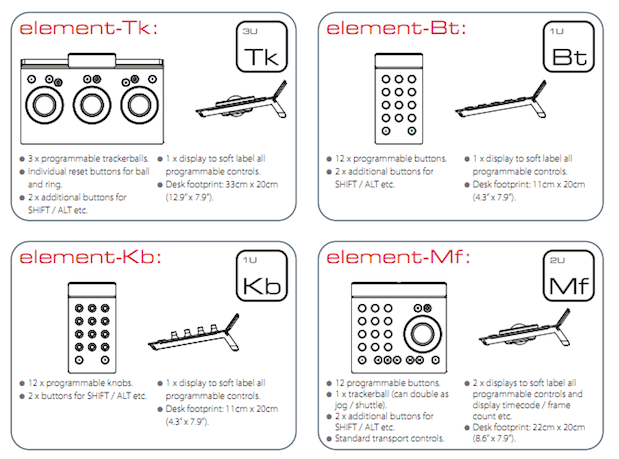
Element Tk panel (that’s the trackballs unit with rings, reset buttons, shift button and display): $1,195

Element Mf panel (that’s 12 programmable buttons, trackball with ring that can be jog/shuttle, transport control, shift buttons, display): $1,095

Element Kb panel (12 programmable knobs, 2 shift buttons, display): $895

Element Bt panel (12 programmable buttons, 2 shift buttons, display): $695

Total for all the pieces together: $3,495

Those prices may vary as it begins to ship but as an early indicator of price that looks pretty good if the construction and quality of the panels are as good as reports have been. For a bit of detail on the development of the Element check out this post from colorist and author Alexis Van Hurkman about the Element and his even better followup about the evolution of the design. Hopefully we’ll get one in the Editblog garage for testing and review as we did with the Tangent Wave (and what was then the Euphonix (now Avid) MC Color).

If we do get one I hope DaVinci Resolve will be supported as that’ll be the weapon of choice. That is unless we see Adobe shipping CS6 with SpeedGrade included. That’s the other wildcard in this whole affordable color grading tools equation. With Apple Color gone the way of the dodo bird we’re left only with Resolve until Adobe ships SpeedGrade. It’s always nice to have competition.

Check below for more details of what each piece of the Element includes. You can sign up for products updates from Tangent as well. As for purchasing an Element, Tangent has a reseller page on their website that could point you in the right direction. As of this post the Element isn’t listed on B and H Photo’s website but I would guess that’ll change as soon as the Element is shipping in larger quantities. If someone gets an early Element I hope they’ll post their thoughts in the comments below. And if someone from Blackmagic Design wants to let us know that Resolve support is coming then we’ll be happy to have that comment too.

image


(Page 1 of 1 pages for this article )

                    Clip to Evernote


The Editing of “Courageous” Part One

Steve Hullfish | 10/14

The off-line edit of a RED feature film

image

Last October, I had the rare opportunity to edit a feature film called “Courageous,” which is in theaters now. “Courageous” was the number one new movie the weekend it opened (September…

Check out a Number of Hardware and Software Options from B&H

Jeremiah Karpowicz | 05/16

Everything you need in one place

image

We grabbed Jerry Zorek, Manager of Business Development at B&H, to learn about what B&H was showing off at their studio booth.  He shows us a Resolve system with the…

Final Cut Pro X Multicam Editing webinar now available on-demand

Scott Simmons | 05/15

Plus a little screencast in this blog post on a topic we didn’t get to cover.

image

I had great fun last week presenting the Final Cut Pro X multicam editing webinar…


You must be registered to comment. This is an effort to reduce spam. Please REGISTER HERE.

Name:

Email:

Location:

URL:

Smileys

Remember my personal information

Notify me of follow-up comments?

Submit the word you see below:


My lengthy Adobe Premiere Pro CS6 review now online
Final Cut Pro X Multicam Editing webinar now available on-demand
10 Final Cut Pro things FCP editors might be missing in Adobe Premiere Pro CS6
A collection of Avid Media Composer related links for my NAB Migrating to Avid class
An elegant iPhone timecode calculator
Random notes from my first “real world” Adobe Premiere Pro CS6 edit
NAB 2012: SpectraCal
NAB 2012: Apple and Final Cut Pro X
NAB 2012: Lightworks
NAB 2012: Baselight for Avid Media Composer
NAB 2012: Quantel new Pablo and Neo Nano
NAB 2012: Promise Technology’s portable Thunderbolt J4 and J2
NAB 2012: NewBlueFX Titler Pro
NAB 2012: PluralEyes 3.0 from Singular Software
NAB 2012: Technicolor CineLights from the GoPro booth
Autodesk Smoke 2013: it really changed for the better
My top 5 (or so) Adobe Premiere Pro CS6 features
How to preview Avid Media Composer’s MXF files for free without Media Composer
My NAB 2012 Post|Production World classes
Baselight for Final Cut Pro is one of the most powerful legacy FCP grading plugins ever
ARRI’s DNxHD Alexa update, Sorenson Squeeze Pro and OP this, OP that
What’s happening at NAB 2012?
The C300 short Hustle and some before and after images
Tip Tuesday: Disable a clip in the Avid Media Composer timeline
Testing the 7toX Final Cut Pro 7 to Final Cut Pro X conversion
Q and A with Bunim/Murray’s Mark Raudonis about their recent Avid switch
Kicking the tires on the Final Cut Pro X 10.0.3 Multicam update
Update Alert: Final Cut Pro X goes to 10.0.3
Adobe teases Prelude at the San Francisco Supermeet, FCPUG changes its name
Tangent Element panels are now shipping


The Editing of “Courageous” Part One

Steve Hullfish | 10/14

The off-line edit of a RED feature film

image

Last October, I had the rare opportunity to edit a feature film called “Courageous,” which is in theaters now. “Courageous” was the number one new movie the weekend it opened (September…

Check out a Number of Hardware and Software Options from B&H

Jeremiah Karpowicz | 05/16

Everything you need in one place

image

We grabbed Jerry Zorek, Manager of Business Development at B&H, to learn about what B&H was showing off at their studio booth.  He shows us a Resolve system with the…

Final Cut Pro X Multicam Editing webinar now available on-demand

Scott Simmons | 05/15

Plus a little screencast in this blog post on a topic we didn’t get to cover.

image

I had great fun last week presenting the Final Cut Pro X multicam editing webinar…

10 Final Cut Pro things FCP editors might be missing in Adobe Premiere Pro CS6

Scott Simmons | 05/11

These are a few of the things that I found myself searching for as I’ve been moving over to Premiere Pro CS6 as a FCP 7 replacement

image

Adobe is making a big play for Final Cut Pro users with their CS6 release of Premiere Pro. It’s vastly improved over the Premiere Pro of old and is a lot like Final…

To be considered for listing, contact pr (at) provideocoalition (dot) com


Copyright © 2012, HD Expo, LLC a division of Diversified Business Communications. DBA Createasphere

All rights reserved. HD EXPO, High Def EXPO, Createasphere, E-Tech, Entertainment Technology Exposition, 3D Production Workshop, VariCamp, P2 Camp, ColorCamp 101, and Lighting, Filters & Gels for HD are all trademarks of HD Expo, LLC.

Terms of Use  |  Privacy Policy

Check PageRank