

Filmtools
Filmmakers go-to destination for pre-production, production & post production equipment!
Shop NowIt’s no hardware control surface replacement but it’s fun and it’s free

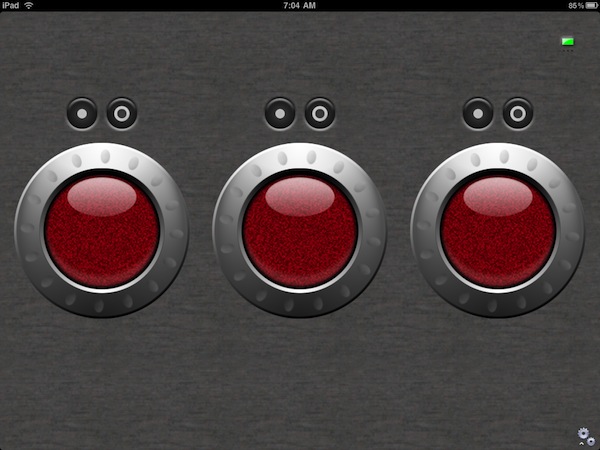
Today Tangent Devices saw their first ever iPad app approved by the Apple Gods and with that blessing vWave-Lite is available from the iTunes App store. I took a few minutes and gave it a test run in Apple Color (sadly no DaVinci Resolve for Mac support) and while it’s most certainly no replacement for a full-on Wave hardware control surface it’s great for free!
Here’s the description from the iTunes store vWave-Lite page and there’s some interesting info in there:
This is the “Lite” version, so at present you can only control the colour differentials and masters. The full version of vWave will be available soon and this will give you full access to all the controls in Color – just like you can do with our physical panels: Wave and CP200 series.
You can use vWave-Lite simultaneously with your Wave or CP200 panels.
You can use all the controls on the iPad simultaneously.
There is no need to have access to the internet from your iPad or the Mac running Color for vWave-Lite to work, but you will need to have the iPad and the Mac connected to the same network. You will need to have installed Color v1.5 (or greater) on your Mac as distributed in the Apple Final Cut Studio suite of applications.
You will need to install the Tangent Color Support Package v3.8 (iPad version) on your Mac which is free to download from the support page of our website: www.tangentwave.co.uk.
The Mac you are running Color on must be connected to the same network that your iPad is connected to.
Only one iPad running vWave-Lite can be connected to the network that your Mac running Color is on.
Installation from the app store is simple on the iPad, just search vWave and it’ll pop up (here’s the iTunes web link). On the Mac you have to download the latest Tangent support update for Color version 3.8. You can do that at this link but beware that you have to provide an email address and then confirm that email address to get the download link.
Now let’s pause for a quick downloading editorial
I realize that it’s probably important for companies to data mine their customers and collect email address for a mailing list but it’s so frustrating when they require you to confirm your address via a click to get a driver software download. When you provide that email address you get this message:
Thanks for asking to download the Color Support Package for vWave-Lite. You will shortly receive an email asking you to confirm your email address. Please click the link supplied.
After you have completed the process you will receive an email within 24 hours that explains how to download the files.
I provided two different emails for two machines at around 7:30 am central time and I still haven’t gotten that confirmation email and download link. I realize it hasn’t been 24 hours but should it take that long just to get a software driver? Thankfully a helpful Twitter user provided the direct link but I don’t feel it’s right to circumvent Tangent’s process here by providing that link. I just wanted to comment on how frustrating this all to common practice is. I don’t mind providing an email for a mailing list for companies I use and trust but the return click and conformation BEFORE I can get the download is very frustrating.
UPDATE: Tangent has changed the download procedure for getting the updated Color software drivers for their tools. Instead of waiting on a return confirmation email you are provided with a direct link on the second page after providing your email address. That’s more like it.
Now back to the vWave-Lite:
After you DO get the download then a quick install is required. The vWave works over your computer’s wireless network. On my MacPro at home I don’t have an Airport card on the machine itself, instead being connected to a wireless AirPort router via Ethernet and it worked perfectly.
Once the driver is installed and Color is booted be sure and choose Tangent Color Plug-in v3.8 in the Color preferences:

If that’s done correctly it should connect right up. There’s a little connection light in the upper right corner of vWave and that will turn green once connected. If you want to read a bit about the vWave-Lite directly from Tangent then check out the Tangent Wave support page and download the Color Support Package User Manual as it’s got a small section about the vWave-Lite too.
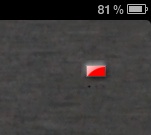
A connection light flashes orange/red until the vWave-Lite is connected.
How is the vWave-Lite’s operation?
vWave-Lite is a very fun little piece of software. It’s simple: you’re provided with the Wave trackballs and rings as well as reset buttons for both. There’s a settings icon in the lower right corner that brings up sensitivity controls.

The only real adjustment on the vWave-Lite is the sensitivity controls
There’s a couple of really nice things to the vWave operation. The controls support “momentum” so if you flick a trackball really fast the momentum will carry the correction through until that momentum slows down. You can also operate more than one control at a time which is part of the whole beauty of a control surface! I found that I had to look down at the iPad an awful lot to make sure I had my fingers in the right place but once you do then you’ll see realtime feedback in the Color display and video scopes.
The design of vWave seems to be based more of Tangent’s CP200 product with the rings around the trackballs as opposed to separate trackballs and dials like the actual Wave uses. To have them separated like the Wave design might make it easier to grab one or the other and there is probably enough room on the iPad to do just that. Maybe that will be an option in the full version which, according to the release email, Tangent is soliciting feedback on.
Is vWave a replacement for the hardware Wave?
vWave-Lite is quite a fun little toy to have when working with Color but it is in no way a replacement for the actual Tangent Wave … no way, no how. Is it better than mouse only? Sure. It’s a great supplement for mouse only Apple Color grading.
Tangent says there will be a paid version coming later so let’s hope that adds some other controls like dials for master lift/gamma/gain and individual RGB channel lift/gamma/gain controls. It would also be really nice to add support for DaVinci Resolve for Mac since Resolve doesn’t have traditional color wheels for adjustments like Color, Magic Bullet Colorista or the built-in FCP 3-Way Color Corrector. In fact the more I think about it that would be really nice to supplement Resolve.
I had mentioned just such an idea in a post a while back about post-production apps on the iPad. Tangent calls this more a technology demonstration and it works well so it’ll be exciting to see where they take the vWave-Lite. To be honest even if they did nothing more that what it is now it’s great to provide it for free to iPad users.
What I bet many will find is that when they use vWave-Lite they’ll really long for the real-deal Wave control surface. Not having to look down and see where you’re placing your fingers and getting that tactile feedback is the best way to work when grading. In fact the vWave technology will probably help sell a few more hardware Tangent Waves.