But it can TRIM it and shoot some fun stuff to boot

Okay, let’s get one thing straight about the new Apple iPhone 3G S … it can’t edit the video it shoots. What it can do is trim the beginning and end of each and every clip. That may just be semantics talking but I’ve seen lots of stuff on the Interweb saying that you can edit the video that you shoot on the iPhone … to me editing means that you can actually join two separate clips into one. You can’t do this on the iPhone 3G S. But you indeed can trim your clips to shave off unwanted frames at the head and the tail. It’s a really cool thing to be able to do, especially if you are running low on storage space on the phone. And considering you have to tap the start/stop button on the touch screen (as opposed to say a hard button on the side) you are likely to have some slop at the head and tail as you begin a shot.
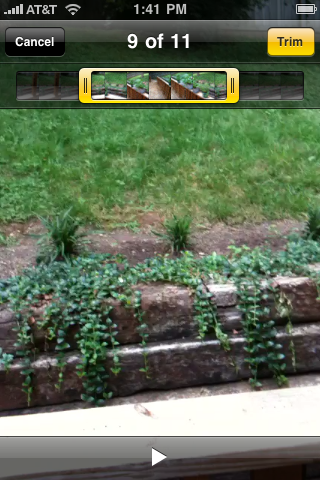
It’s really an ingenious interface once a clip is captured though:

When you play back a clip you have a little filmstrip at the top of the screen with a small playhead. If you want to trim a clip you just tap and drag the handles at the beginning or end of the filmstrip. The handles turn yellow as you adjust them and the screen updates as you trim. When you are happy tap the trim button and you have a shorter clip, space saved.
This is a nice feature. I’m not sure if in-camera trimming is available on other video shooting phones (or micro camcorders like the Flip) or not, but if not then you can bet they will add that in the future. It seems only natural that Apple will add a most rudimentary way to actually edit and join a few trimmed clips together with some update in the future. Winston brought up a good point on Twitter that with all the applications available for the phone it’s a no-brainer that someone will write one very soon. In fact there’s no telling what kinds of video manipulation apps are in the works. With the ability to upload video clips directly to YouTube or MobileMe (not to mention direct email) then a basic editing / clip joining function would be a godsend for the journalist in the field or the dad on the beach. Of course bandwidth is always an issue when sending video around. When I tried to email a minute long clip I got this message:
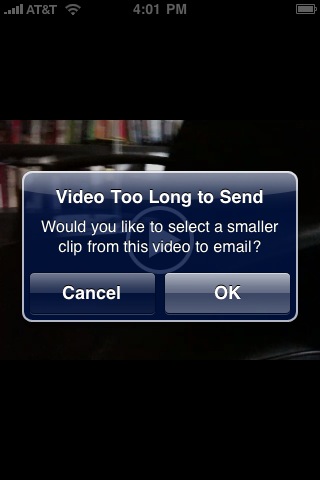
The iPhone didn’t want to email a video longer than 47 seconds and 4.5 megs as that’s the default trim length it gave me. But it did upload the whole minute long clip to MobileMe. It compresses these videos a bit further down to 480×360.
I’ve never had a micro video camera like this before. All of my casual video shooting is with my HV20 rig with GT35Pro lens adapter so this concept of always having a video camera available is new in my mind. I took the iPhone 3G S out for a stroll around the neighborhood this morning just to grab a few shots and see what the video looks like.
Video is recorded at VGA resolution. It’s 640×480 when holding the phone in landscape orientation but it’s 480×640, like a long rectangle, when holding it portrait style. That will make for some funky/fun video. The phone is supposed to shoot at 30 frames per second but I found that often it will capture less. You can see from the Final Cut Pro bin below that FCP is see the fps on a lot of the clips at odd frame rates like 21, 19, or 23 frames per second:
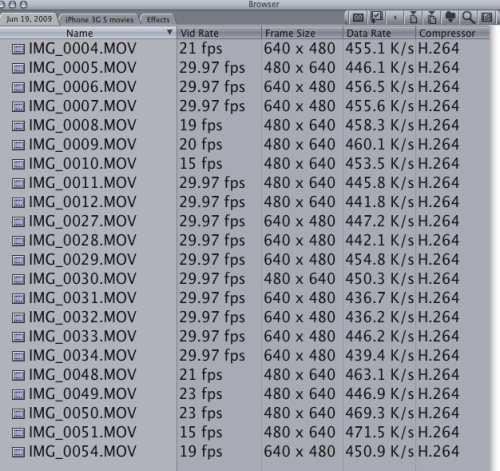
It seems that the less light you have in your surroundings then the less and more sporadic the frame rates were. All this tech talk is just for information purposes only. This is a cell phone shooting video so at this point in technology we can’t expect too much out of it. From just playing with the iPhone 3G S for a couple of days I can say that the video is shoots is great for what you might do with it – capturing the moment; be it fun with friends or the occasional natural disaster to send over to CNN. Imagine how much on the scene video coverage the world will now get with millions and millions of these phones out in people’s hands. If you want more than that, better resolution, better audio, better color space, then get a real camera. I’m going to enjoy it for what it is.
Next, let’s see some actual video from this phone
FYI – there’s 5 QuickTime videos embeded in the next page between 5 megs and 8 megs. May take time to load on slower connections. But they are actually viewable on an iPhone!
I wanted so see how iPhone video would re-compress for the web so here’s a clip, slapped together in FCP, compressed with Compressor. The first is a few shots cut to some music. A lot of this footage is hard on a compression codec with movement, shooting into trees and the sun so this is about the most blocky video you might expect out of the iPhone. Of course the more compression you put on a clip the more blocks you will see. And not to mention these clips are compressed to H264 once upon shooting and then were compressed again from Compressor for the web:
Here’s the same cut just with some very subtle color correction on a few shots and then Magic Bullet Looks on others:
What does that video look like straight out of the phone? Here’s the raw footage from a couple of the shots.
This is the first shot in the edit above:
This is the light pole shot that changes from portrait to landscape in the edit:
And finally one more shot against the rock wall:
That quality isn’t too bad. I’m very happy to have that video capture capability in my cell phone. Now if they just enable the 720p capture ability that is apparently there within the chip then that will be even better. Maybe that’s coming in iPhone os 4.0.


Filmtools
Filmmakers go-to destination for pre-production, production & post production equipment!
Shop Now