
(Page 1 of 1 pages for this article )

Tuesday, June 21, 2011

Filed under: AppleFinal Cut ProEditingGentryMedia Sister SitesHDSLRMac CoalitionProVideo CoalitionPost ProductionSoftware

Those Burning Final Cut Pro X Questions Answered

Scott Simmons | 06/21

The answers aren’t all good but based on rumors they were expected.

image

Well here we are into the first official evening of Final Cut Pro X’s release out into the world. It’s been a busy day and a Twitter search will show a good bunch of love, a whole lot of hate and a little bit in-between. There were a blessed few who got advance copies and they’ve written some FCPX must read articles. If you want to try it yourself then $299 and the Mac Apps Store will get you a copy. I first want to answer the Burning Questions that I had just the other day.

As I mentioned in the Burning Questions article I defined professionals and these questions are ones that pros wanted addressed. We may be a small overall percentage of the video editing market but we are vocal and we push our tools to the limit. One pattern you’ll see below is that FCPX may be adding a lot of these features in the future. One argument you’ll read is that Final Cut Pro X is really a version 1.0 product and features haven’t been left out they just haven’t been written yet.

I don’t buy that argument as Apple chose to market this as Final Cut Pro TEN and be it a new app or not that number comes after SEVEN so it’s not unreasonable to expect things that were in 7 should be in 10. Add to that the fact that Final Cut Pro 7 and Final Cut Studio 3 were removed from the Apple Store today so from this point on it’s FCPX or stay with FCP7 (unless of course you want to move to Avid or Adobe). To completely start from scratch and build a new, modern application is commendable but when it lacks many, many features that its predecessor had and you’re still calling it pro and a newer version then you can expect a lot of negative feedback from current users who rely on those features. FCPX currently sits at two and a half stars in the App Store.

Sure we can choose to stay on FCP7 but we’ve come to believe that FCPX was to be “awesome” and it would be ready for professional use. By my definition here on Pro Video Coalition for these articles it is not ready for professional use. Maybe in a few years after it’s had a lot of features added back but not right now.

The answers please.

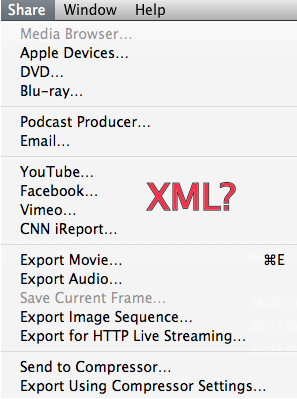
Will FCPX support XML in and out of the application?
image

No. As of right now there is not XML support. Word is that XML will come in the future and it may be something better than XML but as of FCP X 1.0 it’s not there. Of all the things missing from Final Cut Pro X (and there are many) XML seems like one of the two most glaring oversights. So much of Final Cut Pro’s overall success has hinged on 3rd party utilities and many of the best are XML based. Even if Apple had to hold FCPX back to a fall release I think it would have been worth it to add XML. The negative blowback would have been lessened.

Will 3rd party I/O hardware be supported at launch?

Negative. My Matrox MXO2 Mini doesn’t work, neither does my AJA Kona LHe. This is the other of the two most glaring oversights that IMHO should have delayed the release of FCPX until it’s a bit more ready for prime time. One thing that did happen today was that AJA released a KONA X Beta Drivers for their KONA 3G, KONA 3 and KONA LHi products. But give a read to the pdf documentation and you’ll see this is a kludgy solution at best as its using FCPX’s Show Viewer on Second Display option to use your broadcast monitor as an extension of the computer desktop.

I don’t think this is AJA’s fault and they should be commended for coming up with some solution but how Apple can released a “pro” editing application with what is supposed to be advanced color grading controls with no ability to use installed, accepted, industry standard hardware to view on a broadcast monitor is beyond me.

Will 3rd party plug-ins work?
image

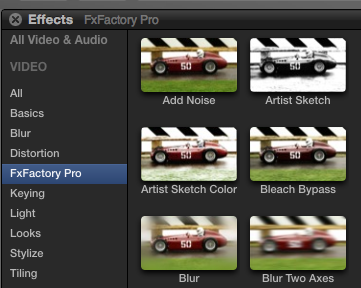
Fx Factory seems to be the first effects plugin to work with FCPX.

Yes and no. Overall 3rd party plug-ins aren’t supported and according to some of the developers I talked with, as of right now, there’s no API for developers to write to. If you look at Apple’s Motion 5 page there is mention of FxPlug2 but word on Twitter is that developers aren’t very happy. Noise Industires did release FxFactory 2.6  with FCPX and Motion 5 support (Motion 5 hit today too for $50) so there is at least one effects plugin package available.

Automatic Duck also released an update for their Pro Export FCP that “includes an export app that works with the new Final Cut Pro X to export AAF or OMF to send audio to Pro Tools.” That’s good as that means it’s possible but there’s a lot more exporting we need than just audio to Pro Tools (though that is a BIG one). Odd thing is that at $495 that export to Pro Tools option costs more than Final Cut Pro X.

We should see a few more 3rd party developers release some FCPX tools in the coming weeks.

Will there be any tape-based support?

The good news: YES! The bad news: It’s only for Firewire-based cameras: DV, HDV, probably DVCPRO HD. So as for capturing from broadcast tape decks like D-Beta or HDCAM SR (or outputting to those formats and all others) it’s not happening in FCPX. You can use 3rd party tools to capture to Prores and output to tape but not in FCPX.

What strikes me as really odd about supporting Firewire cameras is that Apple itself has been moving away from Firewire (not to mention all the camera manufacturers) so why even support Firewire tape at all? If FCPX was a total rewrite from the ground up why spend any resources writing that kind of support when it could have been spent working on 3rd party hardware? Unless that was just code copy/pasted from iMovie is really feels like a waste.

Will we be able to switch the FCPX layout to a more traditional 2-monitor setup?
image

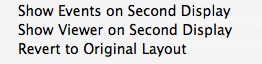
There are very limited options for rearranging the FCPX windows.

No. FCPX is a one window application. There are two options to show Events or the Viewer on a second display but that’s it. You can’t even rearrange existing windows and save that layout into a custom window setting. That’s a real shame as it’s so easy in FCP7 to have many different layout for many different tasks.

Will FCPX support multiclipping and multicam?

No. There is neither multiclipping or multicam. Word is that this will be added back in the future. Are you seeing a pattern here?

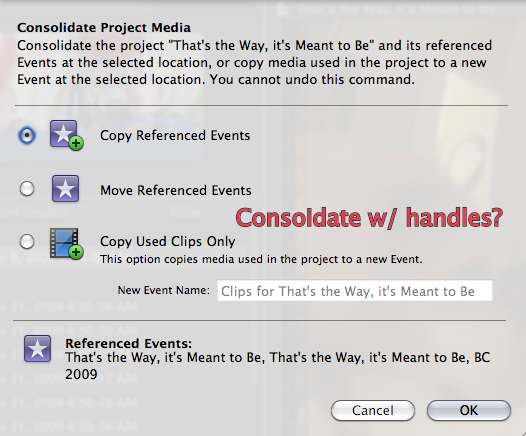
Will there be a Media Manager?
image

There seems to be no option to delete unused media and retain handles.

Kinda. There is a Consolidate Project Media option that will all you to Copy or Move referenced events. You can also choose to Copy Used Clips Only which is like trimming the project down ... but there’s no option to delete unused media with handles.

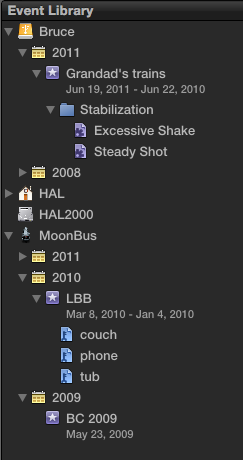
Will FCPX’s Events be the only way to organize media?
image

This could become a cluttered way of organizing and finding media after a lot of projects.

This looks to be the case. Event organization might be something I could get used to, after all you can name a new Event when importing media. But it really feels like hands are tied once Events are created. I’m seeing all my hard drives in the Event Library, even ones where I have no Events. You can add a Folder and organize Keyword and Smart Collections but not events themselves.

After a couple hours of playing I have a rather cluttered looking Event Library with way more twirly disclosure triangles than I would care to navigate on a daily basis. Thankfully there’s a Find/Filter option that can be called up when clicked on an Event that has some powerful filtering options.

Will there still be a Studio?

No. The only applications left (these are Mac App Store links) are Final Cut Pro X for $300, Motion 5 for $50 and what appears to be a still 32-bit Compressor for $50. Some people say that Color and Soundtrack Pro are now built-in to FCPX and while there are color and audio tools in FCPX they aren’t as powerful or feature rich as those now gone dedicated applications were. And you can’t rely on auto color tools to always get the job done right.

You’re going to want Compressor as even though there’s a number of Share options you can’t export only a piece of the FCPX timeline (say a single shot to send to vfx). It’s the whole thing or an Export to Compressor to select an IN to OUT. At least that’s what I hear, when I try to export from an open timeline FCPX crashes.

Wrap up.

There is a lot to like in Final Cut Pro X and I’ll definitely be kicking the tires on it a lot more. While I won’t be using it on mission critical, client jobs I’ll cut some of my own person stuff on it and continue to dig deeper. There are some features I really am excited about trying. I hope to post a full kicking the tires article at some point in the next few weeks.

Next week, on June 30 at 10:00 AM PDT, I’m presenting a free webinar called Final Cut Pro X Hands On Tour. This webinar will go into more detail about a lot of these features, questions and concerns. It’ll be a fun and honest look at FCPX so register for free if you want to attend.

 

(Page 1 of 1 pages for this article )

                    Clip to Evernote


The Editing of “Courageous” Part One

Steve Hullfish | 10/14

The off-line edit of a RED feature film

image

Last October, I had the rare opportunity to edit a feature film called “Courageous,” which is in theaters now. “Courageous” was the number one new movie the weekend it opened (September…

Final Cut Pro X Multicam Editing webinar now available on-demand

Scott Simmons | 05/15

Plus a little screencast in this blog post on a topic we didn’t get to cover.

image

I had great fun last week presenting the Final Cut Pro X multicam editing webinar…

10 Final Cut Pro things FCP editors might be missing in Adobe Premiere Pro CS6

Scott Simmons | 05/11

These are a few of the things that I found myself searching for as I’ve been moving over to Premiere Pro CS6 as a FCP 7 replacement

image

Adobe is making a big play for Final Cut Pro users with their CS6 release of Premiere Pro. It’s vastly improved over the Premiere Pro of old and is a lot like Final…


You must be registered to comment. This is an effort to reduce spam. Please REGISTER HERE.

I have a laptop with an 128GB SSD drive I am thinking I would put FCP X on it. In FCP Studio I typically just used an external drive for storage/editing and shelved the drive once the project is finished. Is this a possible strategy with FCP X?

Posted by .(JavaScript must be enabled to view this email address)  on  06/21  at  09:33 PM


So that’s that, then. I’m fallen out of love with Apple. Or they’ve fallen out of love with me. Either way, frankly, this is appears to be a fancy, work-flow limited update to iMovie. If all the former pro features were there, I might be prepared to forgive them the iMovie GUI/environment but this release lacks focus and a definitive, *existing* target audience/group and, consequently, feature-set. Has arrogance finally got the better of Apple’s Pro division? How could they lose the plot so badly?

Suffice it to say that “Right now, I’m thinking Adobe’s”. Or Avid. Or Smoke. Just not this. Maybe not even X.2 or X.3. May check it again in a few years time. Or may be happily married to another NLE. [Sigh].

Posted by Justin Benn  on  06/22  at  03:36 AM


You hit the nail on the head with this article. I purchased FCPX on my macbook yesterday to start off. Tried to run it on my 2006 Mac Pro and was denied, my video card was not good enough. I was scared for a minute as I thought it replaced my copy of FCP7, but put it in another folder. As far as I am concerned this is iMovie Pro. It is not intuitive at all and lacks many of the features I would miss in earlier versions. One of the worst ones is the Events media management. As you said, I do not want a project from 2 years ago to show up. When I have a client by me, I want only their project in view, it looks and feels like crap, for lack of better words.

I have well over $2,000.00 invested in Final Cut Studio starting with FCP5 through FCS3 and am VERY disappointed in Apple. I feel like they have left me out to dry. I was trying to stay positive about them, but after a painful MobileMe hassle, hardware non-updates, moving everything to an iOS interface and now iMovie Pro (sorry, I mean FCPX), I am throwing in the towel.

Apple doesn’t even want me as a customer any longer, so I am sure they won’t miss me.

Posted by splitrock  on  06/22  at  04:16 AM


I’m now worrying about how much longer my Mac Pro will be supported. Seriously. Why? Think about it:

Server hardware: gone.
Shake: gone.
DVD authoring: ha ha!
Blu-ray authoring: nope.
Color: killed off.
Soundtrack Pro: nuked.
FCP 7: gone.

Why are they asking me to learn a new way of using the timeline? answer? They’re not asking me. They’re not even addressing me. Magnetic timelines or whatever they call them are for people who are unfamiliar with NLEs - ie, the iMovie user. And such restricted workflows and I/O options. Got two screens? Want to use FCPX that way? I don’t think so.

What other reason do I have to use a Mac Pro? None. What other reason do Apple have to support them if they produce no Pro software anymore? None.

Posted by Justin Benn  on  06/22  at  04:33 AM


You hit the nail on the head with this article. I purchased FCPX on my macbook yesterday to start off. Tried to run it on my 2006 Mac Pro and was denied, my video card was not good enough.
mini laptop

Posted by jastinben  on  06/22  at  06:49 AM


Whoa!
I think the basic problem still lies in the Leader (Apple FCS3) being so late to the 64bit party. They let their beauty languish while folks like Adobe really beat them to the punch with a fully functioning pro 64 bit studio.

So Apple kind of limited their options by being so far behind: 1) continue to wait in 32bit land while they fully developed a new full 64bit studio and let the draining of pro editors become exponential 2) come out with an entirely new 64bit paradigm interface and hope it sticks. And then price it at a point that would bring in a huge new non-pro customer base to support the economics.

If you think about it, by doing what I am thinking is an early “partial” release, it provides us with the opportunity now to play with the new program basics on the side to learn it. I am thinking that in a year or two, this new “thing” will be greatly improved and if you take the time to play with it, you may be happy in a year or two.

But for folks making money with these tools, your choices are limited to either staying in 32bit land with FCS3 and suffering the render hell time loss, or taking the same time of learning/playing on the side with a different 64bit studio such as Adobe’s. Adobe surely seems to be far ahead of the game at this point. And it works on the Mac Pro towers from 3,1 onward - especially with an nVidia 4000 for the Mac card.

This whole marketing episode sure seems to be a wierd Apple mistake. They are usually very adept.

A cursory look at Motion 5 makes it look pretty good - and the fact that MUCH of Motion 3 and 4 were retained maybe is a lesson for Apple - maybe it isn’t wise to entirely trash the paradigm of a solid working model so familiar to so many. This is a long journey for your customers too - learning, training books and DVD investments, plug-ins, cards, workflows, old projects, keyboard shut cuts, ancillary hardware, etc - those all very important to your customers Apple.

Posted by lightprismtv  on  06/22  at  07:15 AM


Pro editors can use FCP 7 concurrently.

Apple is all about iOS, not OSX.

Moore’s Law is still kickin’. So, we’ll all be editing on 24” Octo-core iPads soon enough.

And it will be rad. Like going from linear to NLE editing.

All the best to the engineers out there,
Andrew

Posted by aburke  on  06/22  at  09:45 AM


What about native editing? I work on Windows, but I am interested in how people do stuff on the other side. Correct me if I am wrong, FCP does support other codecs besides ProRes. In particular, it does support MPEG-2 and AVC. But it does not support containers other than QuickTime. So, at a minimum Apple should have implemented support for popular containers like MPEG-2 TS, MPEG-2 PS, MP4 and MXF. Did they do it in the FCPX? Is it possible to edit AVCHD video natively without shelling additional $50 for ClipWrap?

I just love Vegas for its native editing capability.

Posted by .(JavaScript must be enabled to view this email address)  on  06/22  at  06:23 PM


Ok, found in a linked article that native editing is supported, but not for XDCAM EX (MP4 container) yet.

Posted by .(JavaScript must be enabled to view this email address)  on  06/22  at  06:41 PM


I am completely dumbstruck, I have to admit.

I was hoping after the demo some two months ago, that the case will actually be better than it seemed.

I thought, that “these are the guys who created final cut in the first place. They know what they are doing”.

Yesterday I started up FCPX, and become genuinely sad.

In the past few years people kept asking me “why FCP?”
And I always sad this: I have tried all mayor NLEs out there, and I simply couldn’t find any better than FCP.

Now I’m actually concerned what my tools will gonna be in the future.

I have built a living on FCP, and I don’t want to go Avid Ally anytime soon.

But it sure seems that way right now…

Oh, and yes:

After purchasing two mac pro systems for a price of a car, after investing in so much hardware and software to go with it i do feel cheated, and abandoned by apple.

Posted by .(JavaScript must be enabled to view this email address)  on  06/24  at  12:40 AM


I feel totally cheated and abandoned. After years of professional usage and tens of thousands of dollars invested in software and hardware, Apple has left me out to dry.

Good thing I am a competent Avid user or I’d be freaking out. Now I’m just sad. I’ve always been an outspoken FCP supporter, believing it to be the best for the job.

It didn’t even have a broken leg, to the contrary FCP was proving to be a stronger and more professional application with each version, and yet Steve Jobs has taken it out behind the barn and shot it in the head.

Posted by NJohnston Media  on  06/24  at  04:59 AM


Not sure what all the fuss is about. Conan’s editors LOVE Final Cut Pro X! wink

http://www.youtube.com/watch?v=sRzLP0FJ82I

Posted by FilmVideoDigital  on  06/24  at  05:53 AM


Nice one FVD!

Posted by Justin Benn  on  06/24  at  06:07 AM


Re the O’brien clip:

I trust that there will be a some kind of follow up to this to see how long O’brien’s editors continue to labor under FCP before they adopt Adobe.

I also suspect that films schools nationwide (and indeed worldwide) will quickly abandon FCP/FCS.

Posted by wsmith  on  06/24  at  09:21 AM


wsmith, this is why I also say that the Mac Pro’s days are numbered. If you’re a school or a large post house, or broadcaster, it has to be cheaper for you to get a suite of decent PCs than a suite of Mac Pros.

The margins on a Mac Pro can’t be great. I give it 2 years tops. Apple’s vision probably has the iMac as the optimum destination for FCPX.

Posted by Justin Benn  on  06/24  at  09:54 AM


Justin,

Certainly!

Much cheaper to build your own PC and get better performance for the buck. I’ve been doing it for years, since the days when it was far from easy.

Higher-end purchased PC systems have no shame compared to Mac Pros in terms of performance and cost less. When you add the rather trivial (nowadays) aspect of upgrading a GPU card or other internal hardware, PCs win hands down.

I will say this about Mac: I’ve always marveled at how quiet they are. I have long integrated liquid cooling to address the noise and it does indeed make it significantly quieter and guarantees adequate cooling (a primary concern when building your own power workstation). I recently read about a Matrox solution announced at NAB 2011 that allows the PC to be in another room. That will be coming soon for me.

Posted by wsmith  on  06/24  at  10:47 AM


I’d hate to move BACK to PCs, but I obviously will if I have to. Without pro apps, there’s absolutely no reason to won a Mac. People say they are better quality than a PC, but I fond that debatable. I’ve owned several PCs and then several Macs, and I honestly had more hardware failure with the Apple computers than my Acer notebook or my Dell desktop.

Dell/Acer = no hardware failure (in fact my dad still is running both machines without problem ((Acer was built in 1998 and the Dell in 2002))).

Power Mac G5/PowerBook G5/MacBook Pro i7 = 2 failed mother boards, 1 nuked HD, 1 runied graphics card and 1 failed power connector socket

After this FCPX garbage I’m left wondering why I’ve been wasting my money all these years…..

Posted by NJohnston Media  on  06/24  at  06:14 PM


A lot of people are giving Apple a pass on FCPX’s issues by saying that you can just keep running 7.

Except that none of those individuals have considered that the timing of dropping FCP7 and the imminent release of Lion may not be coincidental.
It very well could be that Lion breaks FCP7 and they know it. And they didn’t want to invest any engineering time on making it work.

Which sticks you with an old operating system. Which can cause plenty of problems with other apps you may be running as they do upgrades.

Posted by .(JavaScript must be enabled to view this email address)  on  06/25  at  03:56 PM


It should be clear by now that Apple lost real interest in FCP a long time ago. They could have remained in the forefront of its competitors and developed for 64bit a long time ago.

They are taking for granted that amateurs and newcomers will stick it out. Surely they cannot think that most pros will. Again, I doubt they care or they’d have acted accordingly a long time ago.

The money they make on i-devices makes revenue from FCP seem insignificant.

Posted by wsmith  on  06/25  at  05:36 PM


Nobody in FCPs current audience is going back to PCs. Or desktops.

When FCP was released in 1999, it was wild n’ crazy, and it didn’t change drastically for a decade. Sound familiar?

If Apple has lost interest in FCP, they certainly have lost interest in OSX, too. Both appear to be in serious transition; OSX is now half-iOS, and FCP is now nearly half-iMovie. And iMovie has been ported to iOS.

Remember:
“If I were running Apple, I would milk the Macintosh for all it’s worth—and get busy on the next great thing. The PC wars are over. Done….” -Steve Jobs

Happy Editing,
Andrew

Posted by aburke  on  08/20  at  01:16 PM


The last two posts are obviously link spam.

Is this site losing control of this stuff? Only going to get worse if it isn’t prevented.

Posted by wsmith  on  09/12  at  08:34 AM


I think those posts are now gone wsmith. When I check today they aren’t there. Comment spam is very hard to deal with these days as spammers are getting more and more devious, often using content from the article in the spam comment. Frustrating

Posted by Scott Simmons  on  09/18  at  05:13 AM


Of course there is a way to stop it, which I described previously.

Have a person authenticate all members and especially all new ones. That’s done the same way other sites do it. Send an automated email to would-be subscribers. If nothing comes back or comes back from a site so far removed from this industry, no memebership is granted - unless they substantiate themselves. In which case they wouldn’t violate the terms. 

The problem here is that it’s too easy to get admission. Make it just a bit harder to get permission to post comments. Takes a bit of time by a human but not much at all and is worth it to members.

Posted by wsmith  on  09/18  at  08:40 AM


Name:

Email:

Location:

URL:

Smileys

Remember my personal information

Notify me of follow-up comments?

Submit the word you see below:


Final Cut Pro X Multicam Editing webinar now available on-demand
10 Final Cut Pro things FCP editors might be missing in Adobe Premiere Pro CS6
A collection of Avid Media Composer related links for my NAB Migrating to Avid class
An elegant iPhone timecode calculator
Random notes from my first “real world” Adobe Premiere Pro CS6 edit
NAB 2012: SpectraCal
NAB 2012: Apple and Final Cut Pro X
NAB 2012: Lightworks
NAB 2012: Baselight for Avid Media Composer
NAB 2012: Quantel new Pablo and Neo Nano
NAB 2012: Promise Technology’s portable Thunderbolt J4 and J2
NAB 2012: NewBlueFX Titler Pro
NAB 2012: PluralEyes 3.0 from Singular Software
NAB 2012: Technicolor CineLights from the GoPro booth
Autodesk Smoke 2013: it really changed for the better
My top 5 (or so) Adobe Premiere Pro CS6 features
How to preview Avid Media Composer’s MXF files for free without Media Composer
My NAB 2012 Post|Production World classes
Baselight for Final Cut Pro is one of the most powerful legacy FCP grading plugins ever
ARRI’s DNxHD Alexa update, Sorenson Squeeze Pro and OP this, OP that
What’s happening at NAB 2012?
The C300 short Hustle and some before and after images
Tip Tuesday: Disable a clip in the Avid Media Composer timeline
Testing the 7toX Final Cut Pro 7 to Final Cut Pro X conversion
Q and A with Bunim/Murray’s Mark Raudonis about their recent Avid switch
Kicking the tires on the Final Cut Pro X 10.0.3 Multicam update
Update Alert: Final Cut Pro X goes to 10.0.3
Adobe teases Prelude at the San Francisco Supermeet, FCPUG changes its name
Tangent Element panels are now shipping
Avid Media Composer 6 review online


The Editing of “Courageous” Part One

Steve Hullfish | 10/14

The off-line edit of a RED feature film

image

Last October, I had the rare opportunity to edit a feature film called “Courageous,” which is in theaters now. “Courageous” was the number one new movie the weekend it opened (September…

Final Cut Pro X Multicam Editing webinar now available on-demand

Scott Simmons | 05/15

Plus a little screencast in this blog post on a topic we didn’t get to cover.

image

I had great fun last week presenting the Final Cut Pro X multicam editing webinar…

10 Final Cut Pro things FCP editors might be missing in Adobe Premiere Pro CS6

Scott Simmons | 05/11

These are a few of the things that I found myself searching for as I’ve been moving over to Premiere Pro CS6 as a FCP 7 replacement

image

Adobe is making a big play for Final Cut Pro users with their CS6 release of Premiere Pro. It’s vastly improved over the Premiere Pro of old and is a lot like Final…

Color Correction Practice Game

Steve Hullfish | 05/05

Test your skills, improve your eye

image

I found a very cool little site that tests your ability to match a specific color based on hue, saturation and brightness. At first, I thought it was just kind of cute,…

To be considered for listing, contact pr (at) provideocoalition (dot) com


Copyright © 2012, HD Expo, LLC a division of Diversified Business Communications. DBA Createasphere

All rights reserved. HD EXPO, High Def EXPO, Createasphere, E-Tech, Entertainment Technology Exposition, 3D Production Workshop, VariCamp, P2 Camp, ColorCamp 101, and Lighting, Filters & Gels for HD are all trademarks of HD Expo, LLC.

Terms of Use  |  Privacy Policy

Check PageRank