
(Page 1 of 1 pages for this article )

Saturday, July 02, 2011

Filed under: AppleFinal Cut ProCS5EditingGentryMedia Sister SitesMac CoalitionProVideo CoalitionPost ProductionSoftware

Update alert! Magic Bullet Suite 11 and DaVinci Resolve 8

Scott Simmons | 07/02

One is a new update and one is shipping from an NAB announcement

image

Two big software updates have recently dropped. Red Giant Software released version 11 of Magic Bullet Suite including a new product in the suite called Cosmo. Meanwhile Blackmagic has begun shipping the big version 8 update to DaVinci Resolve.

Magic Bullet Suite 11

The Magic Bullet Suite 11 is highlighted by a new version of Magic Bullet Looks as well as a short film to showoff some of the stuff that Red Giant products can do .

Here’s the bullet point list for the new Looks:

  • A revolutionary interface makes creating and customizing new looks easier and more intuitive
  • Reorganized interface is cleaner and more intuitive but keeps the heart of Looks 1
  • Over 64 new and updated presets for a total of over 100, all inspired by real-world projects and problems, and tested in commercial projects
  • Adds Video Out preview, the #1 requested Looks feature, for an interactive single frame preview
  • Includes 6 new tools, including Colorista II tools like 3 Way wheels, Ranged HSL, Pop, Hue/Lightness scope, Hue/Saturation scope
  • Makes cosmetic cleanup easy with Cosmo tool for adjusting skin tones and blemishes

It’s cool to see some other Magic Bullet tools put right into the Looks interface as that means more work can be done right in Looks. But the biggest feature by far is external monitor previews for Looks.

Setup is simple as you choose you external video device via the preferences:
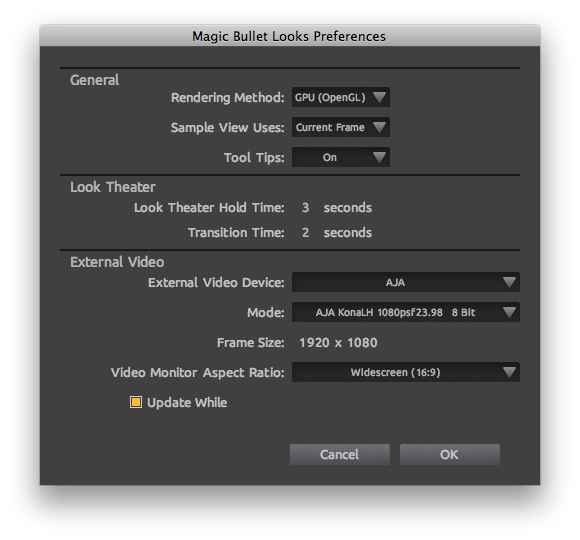
image

Then just hit command + E to preview on the external monitor. As needed a feature as that is I can’t make it work on my current install. When working in Final Cut Pro FCP has control of the AJA Kona card and Looks can’t seem to grab control of the card from FCP. Red Giant support is investigating.

The other new tool is Magic Bullet Cosmo. Here’s the Cosmo bullets which is available seperate from the suite for $99:

  • Make your client VERY happy by preserving her good looks in High Definition closeups
  • Perfect for quick cosmetic cleanup without jumping into in bigger software packages like Magic Bullet Looks
  • Fits seamlessly into color finishing and grading workflow of Magic Bullet Suite but fills its own niche
  • Hit tight deadlines and budget constraints (and avoid sleepless nights) by doing automatic skin retouching instead of manual work

This will be a nice little tool to use under the harsh realities of HD. It reminds me of Digital Anarchy’s Beauty Box so it’ll be fun to see how they compare.

The suite is compatible with many different hosts (though not yet FCPX and not Avid Media Composer [grrrr]) so check individual products for compatibility.

DaVinci Resolve version 8
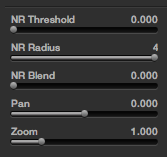
image

Noise Reduction is now available under the Primary grading tab

One of the big NAB 2011 updates is now shipping with Resolve 8. There’s tons of new features in 8 and it’s a free upgrade for existing owners.

New features include:

  • Multi-track timeline support
  • Final Cut Pro XML import and export
  • OpenCL GPU support (though that won’t be as fast as a big NVIDIA CUDA GPU)
  • Noise reduction and image stabilization
  • 4 new grading curves
  • And a lot more…

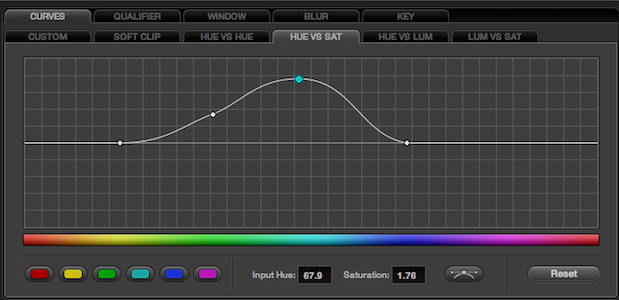
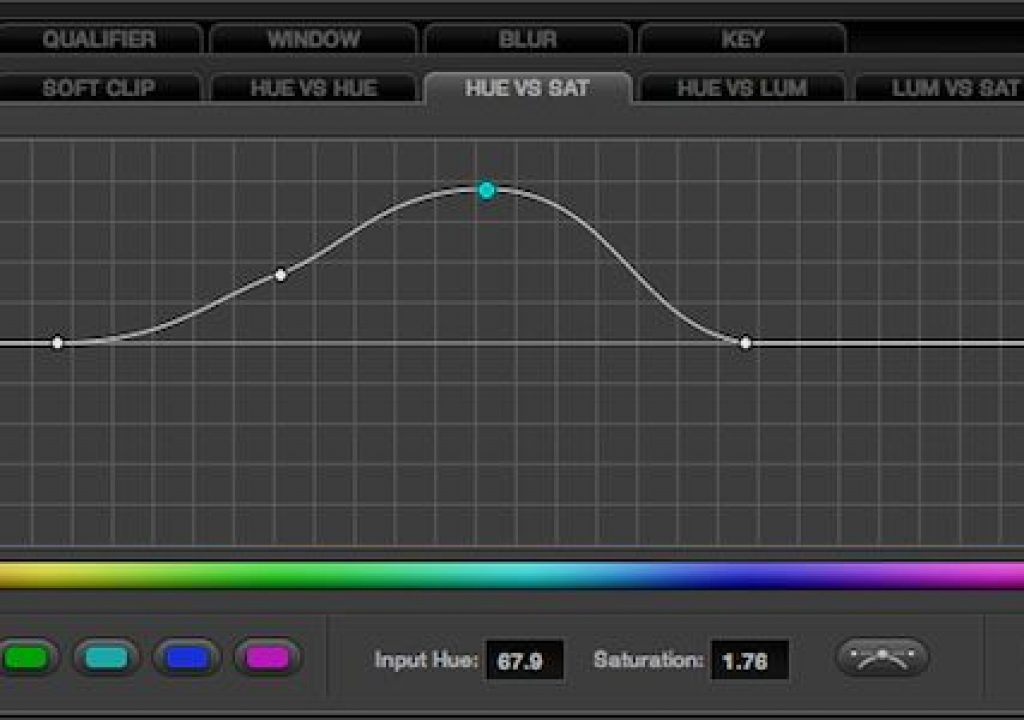
I think my favorite feature is the new addition to the curves grading too: Hue vs. Hue, Hue vs. Sat, Hue vs. Lum and Lum vs. Sat. I haven’t been much of a curves user but I find this vs. concept very simple to understand for an amateur color grading person like myself. They are quite powerful and very fast.

If you want to give Resolve a try (and you may now that Apple Color is apparently dead) the watch for the July release of DaVinci Resolve Lite. That’s a free version of Resolve limited to “SD and HD resolutions, two color correction nodes, a single processing GPU and a single RED rocket card.” That’s pretty crazy to think about a free, feature-limited version of Resolve.

 

(Page 1 of 1 pages for this article )

                    Clip to Evernote


The Editing of “Courageous” Part One

Steve Hullfish | 10/14

The off-line edit of a RED feature film

image

Last October, I had the rare opportunity to edit a feature film called “Courageous,” which is in theaters now. “Courageous” was the number one new movie the weekend it opened (September…

Final Cut Pro X Multicam Editing webinar now available on-demand

Scott Simmons | 05/15

Plus a little screencast in this blog post on a topic we didn’t get to cover.

image

I had great fun last week presenting the Final Cut Pro X multicam editing webinar…

Editing and Effects Together in One Editor Part 2

Brian Mulligan | 05/15

The NLE revolution isn’t over… Enter Autodesk Smoke for Mac

image

Editing & Effects All-In-One
Autodesk has always been known for the strength of their effects and image processing tools. The tools in Smoke have been used in everything…


You must be registered to comment. This is an effort to reduce spam. Please REGISTER HERE.

Name:

Email:

Location:

URL:

Smileys

Remember my personal information

Notify me of follow-up comments?

Submit the word you see below:


Final Cut Pro X Multicam Editing webinar now available on-demand
10 Final Cut Pro things FCP editors might be missing in Adobe Premiere Pro CS6
A collection of Avid Media Composer related links for my NAB Migrating to Avid class
An elegant iPhone timecode calculator
Random notes from my first “real world” Adobe Premiere Pro CS6 edit
NAB 2012: SpectraCal
NAB 2012: Apple and Final Cut Pro X
NAB 2012: Lightworks
NAB 2012: Baselight for Avid Media Composer
NAB 2012: Quantel new Pablo and Neo Nano
NAB 2012: Promise Technology’s portable Thunderbolt J4 and J2
NAB 2012: NewBlueFX Titler Pro
NAB 2012: PluralEyes 3.0 from Singular Software
NAB 2012: Technicolor CineLights from the GoPro booth
Autodesk Smoke 2013: it really changed for the better
My top 5 (or so) Adobe Premiere Pro CS6 features
How to preview Avid Media Composer’s MXF files for free without Media Composer
My NAB 2012 Post|Production World classes
Baselight for Final Cut Pro is one of the most powerful legacy FCP grading plugins ever
ARRI’s DNxHD Alexa update, Sorenson Squeeze Pro and OP this, OP that
What’s happening at NAB 2012?
The C300 short Hustle and some before and after images
Tip Tuesday: Disable a clip in the Avid Media Composer timeline
Testing the 7toX Final Cut Pro 7 to Final Cut Pro X conversion
Q and A with Bunim/Murray’s Mark Raudonis about their recent Avid switch
Kicking the tires on the Final Cut Pro X 10.0.3 Multicam update
Update Alert: Final Cut Pro X goes to 10.0.3
Adobe teases Prelude at the San Francisco Supermeet, FCPUG changes its name
Tangent Element panels are now shipping
Avid Media Composer 6 review online


The Editing of “Courageous” Part One

Steve Hullfish | 10/14

The off-line edit of a RED feature film

image

Last October, I had the rare opportunity to edit a feature film called “Courageous,” which is in theaters now. “Courageous” was the number one new movie the weekend it opened (September…

Final Cut Pro X Multicam Editing webinar now available on-demand

Scott Simmons | 05/15

Plus a little screencast in this blog post on a topic we didn’t get to cover.

image

I had great fun last week presenting the Final Cut Pro X multicam editing webinar…

Editing and Effects Together in One Editor Part 2

Brian Mulligan | 05/15

The NLE revolution isn’t over… Enter Autodesk Smoke for Mac

image

Editing & Effects All-In-One
Autodesk has always been known for the strength of their effects and image processing tools. The tools in Smoke have been used in everything…

Editing and Effects Together in One Editor Part 1

Brian Mulligan | 05/15

The NLE revolution isn’t over… Enter Autodesk Smoke for Mac.

image

Post NAB 2012 Adobe has released the CS6 suite, Avid is pushing Symphony, and you may think that the editing revolution is over… but you would be wrong. Autodesk announced Smoke 2013 for…

To be considered for listing, contact pr (at) provideocoalition (dot) com


Copyright © 2012, HD Expo, LLC a division of Diversified Business Communications. DBA Createasphere

All rights reserved. HD EXPO, High Def EXPO, Createasphere, E-Tech, Entertainment Technology Exposition, 3D Production Workshop, VariCamp, P2 Camp, ColorCamp 101, and Lighting, Filters & Gels for HD are all trademarks of HD Expo, LLC.

Terms of Use  |  Privacy Policy

Check PageRank