(Page 1 of 1 pages for this article )

Friday, January 08, 2010

Filed under: EditingPost ProductionSoftwareTips

Using Dropbox for quick and easy client screeners

Scott Simmons | 01/08

It’s fast, easy and free

Dropbox is an unbelievably handy online file syncing, file sharing and backup service that performs a lot of amazing tasks at a free or affordable price. I have been a .Mac/Mobile Me user for several years now so I hadn’t used Dropbox until recently but now that I am using it I’m very impressed by the service. Check out the Useful Service for Editors: Dropbox article I recently posted on Studio Daily for more specific information on Dropbox. This article is about how to use Dropbox to make fast and easy QuickTimes for client screeners.

The key to making easy clients screeners via Dropbox lies in the Public folder that all Dropbox users have, be it a 2 gigabyte free account or a monthly subscription. Every file in that Public folder gets a public link that can be copied and emailed. Once a file has been uploaded to your Dropbox Public folder you can access the public link via the drop-down arrow at the right of a file name in the Public folder. There you’ll see an option to Copy public link:
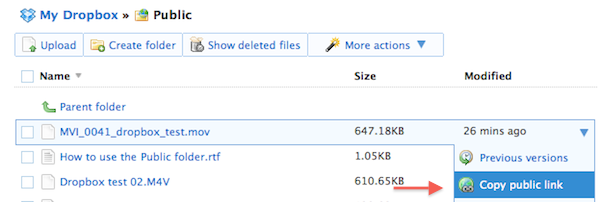
image

Select that option, paste the link into an email and the recipient will get a clickable link that looks something like this: http://dl.dropbox.com/u/3741967/Dropbox%20test%2002.M4V  There’s also an option to shorten the link that uses http://tinyurl.com/.

Depending on the type of QuickTime you might have created it should be a movie that can be opened in most any web browser. The example link above was created with an iPhone compatible preset, hence the .M4V extension, which is becoming more commonly appreciated by clients as it’s easy to view a cut on the go. Any iPhone preset should also be viewable in a regular QuickTime application, including a web browser. The M4V extension can be changed to .mov after the movie is created if so desired. That will keep it from opening in iTunes if the file is downloaded.

Saving a step

The above process is a two step operation: 1 > Export, 2 > Upload. This can be simplified by downloading and installing the Dropbox application. This will add a new folder to your computer (it defaults into your Home directory):
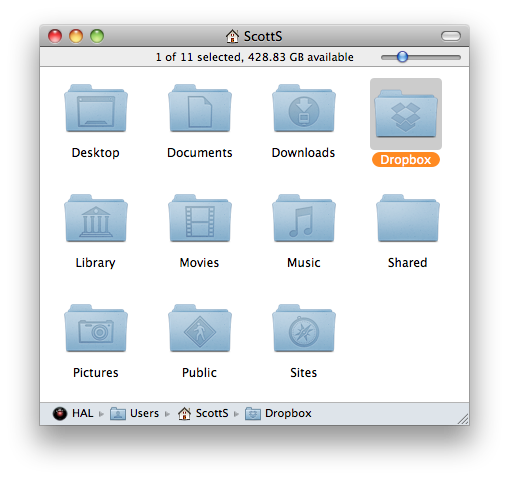
image

And inside that folder you’ll find a Public folder:
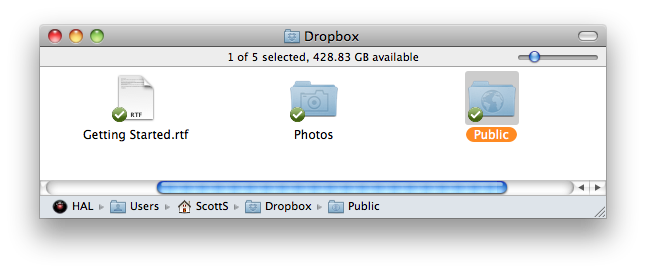
image

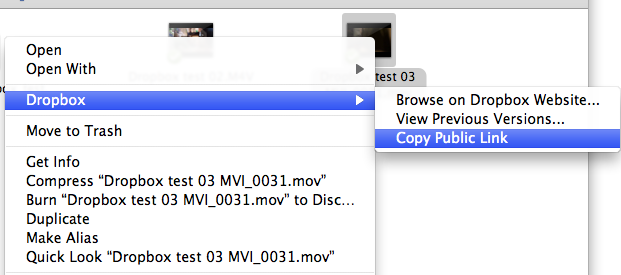
With that installed you’ll be able to skip the Upload step above and just save files directly to the Dropbox > Public folder. The Dropbox application is smart enough to begin the upload / syncing to the cloud once the export has completed. After you have installed the Dropbox application on your Mac (while this is a Mac-based article I don’t see why something similar wouldn’t work on a Windows machine as well) you’ll have a new contextual menu item that allows you to copy the public link right from the Finder without having to log into the Dropbox website:
image

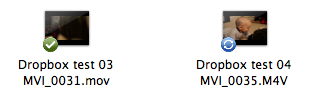
The Dropbox team has thought their service through very well. For example, when a files is uploading there’s a little sync icon vs. a checkmark once the file has completed:
image

It’s a great service, especially if you are just going to use it for QuickTime screeners. While it doesn’t have an option for password protection of files in your public folder the Dropbox site says “Public files are only viewable by people who have a link to the file(s). Public folders are not browsable or searchable.” There’s also an iPhone app available to manage your Dropbox account, send email links and save favorites that are stored locally on the iPhone. If you only need under 2 gigs of storage it’s a helluva deal ... free.

(Page 1 of 1 pages for this article )

                    Clip to Evernote


From start to finish – an arsenal of tools

Marc-Andre Ferguson | 01/25

Finishing options from mobile workstations to pimped out desktops.

Choosing your next editing and finishing system

Marc-Andre Ferguson | 01/19

image

Are you thinking at changing your workflow? Are you looking at another NLE? And if so, why chose just one new application? Why not take this opportunity to think beyond your editing pipeline?

Clean those Adobe Media Cache Files

Scott Simmons | 12/10

And reclaim some drive space in the process

image

I learned something today about Adobe Premiere Pro that I was unaware of. The application creates a media cache when it imports media and that media cache seems to default to the system drive in…


You must be registered to comment. This is an effort to reduce spam. Please REGISTER HERE.

I love Dropbox. I’m currently using it to coordinate my post team: Director in Malaysia, Producer in Alabama, VFX in Thailand, other local crew in Montana. It’s excellent.

Posted by Jay Friesen  on  01/08  at  10:47 AM


I love it too.  Immediately upgraded to the 50GB version, great for moving stuff between multiple machines.

Posted by Jeff Kreines  on  01/08  at  11:51 AM


Big Fan!  Great idea and service!

ps. You don’t mention it, but if you Refer someone (they give you a special link) then you AND they get an additional free 250MB (up to a free allocation of 3GB).  Very cool.
Ra-ey

Posted by .(JavaScript must be enabled to view this email address)  on  01/12  at  10:26 PM


Name:

Email:

Location:

URL:

Smileys

Remember my personal information

Notify me of follow-up comments?

Submit the word you see below:


Q and A with Bunim/Murray’s Mark Raudonis about their recent Avid switch
Kicking the tires on the Final Cut Pro X 10.0.3 Multicam update
Update Alert: Final Cut Pro X goes to 10.0.3
Adobe teases Prelude at the San Francisco Supermeet, FCPUG changes its name
Tangent Element panels are now shipping
Avid Media Composer 6 review online
Update Alert: Magic Bullet Suite 11.2
Update Alert: FxFactory 3.0
The new Fotoshop by Adobé can change the way you look!
Did you know MPEG Streamclip could convert YouTube videos?
New That Post Show: Edit Pro Supergood
Clean those Adobe Media Cache Files
Christmas Gift Ideas for the Editor in Your Life
Kicking the Tires on Avid Media Composer 6
The Adobe Premiere Pro timeline for Final Cut Pro users
Avid Media Composer 6 is announced and it’s moving into the future
All of the Automatic Duck plug-ins are now free
A report on Walter Murch’s talk at the Boston SuperMeet
A lesson learned from my FCPX to Resolve roundtrips
Update Alert: DaVinci Resolve 8.1: FCPX support, lots of little things
A Few Recent Avid Media Composer Finds
A short Q and A with Automatic Duck about their Adobe move
Steve Jobs 1955 - 2011
$995 Final Cut Pro to Media Composer crossgrade ending very soon
Kicking the tires on the Final Cut Pro X 10.0.1 update
You may move your Get license to Boris Soundbite
Detailed demo of the Baselight for FCP7 plug-in
Phonetic dialog search returns as Soundbite from Boris
Some Avid Tools You Might Not Already Be Using
Update Alert: Avid Media Composer 5.5.3 for Lion


From start to finish – an arsenal of tools

Marc-Andre Ferguson | 01/25

Finishing options from mobile workstations to pimped out desktops.

Choosing your next editing and finishing system

Marc-Andre Ferguson | 01/19

image

Are you thinking at changing your workflow? Are you looking at another NLE? And if so, why chose just one new application? Why not take this opportunity to think beyond your editing pipeline?

Clean those Adobe Media Cache Files

Scott Simmons | 12/10

And reclaim some drive space in the process

image

I learned something today about Adobe Premiere Pro that I was unaware of. The application creates a media cache when it imports media and that media cache seems to default to the system drive in…

REVIEW:  Fast Forward Video Sidekick HD Recorder/Monitor

Bruce A Johnson | 12/09

Two for the price of one?

image

PREFACE:  The ProRes Dilemma

Let’s start this review off by dispelling a long-held rumor.  I’m a PC guy, just always have…

To be considered for listing, contact pr (at) provideocoalition (dot) com


Copyright © 2011, HD Expo, LLC a division of Diversified Business Communications. DBA Createasphere

All rights reserved. HD EXPO, High Def EXPO, Createasphere, E-Tech, Entertainment Technology Exposition, 3D Production Workshop, VariCamp, P2 Camp, ColorCamp 101, and Lighting, Filters & Gels for HD are all trademarks of HD Expo, LLC.

Terms of Use  |  Privacy Policy

Check PageRank







