
(Page 1 of 1 pages for this article )

Friday, October 22, 2010

Filed under: CS4CS5EditingPost ProductionSoftwareTipsTrainingFinal Cut Pro

You can reframe your R3Ds in Redcine-X

Scott Simmons | 10/22

And you can use After Effects too for creating nice closeups out of 4K media.

image

When you’re working with high resolution RED media in a high-definition world then one of the advantages of the original 4K image is the ability to reframe shots in post due to the different sizes of the acquired image. You can quite literally create entirely new shots without any softening of the image since the resolution is there. It can be accomplished in RED’s free software Redcine-X though I have to admit it took me a bit of time to figure out how to do it.

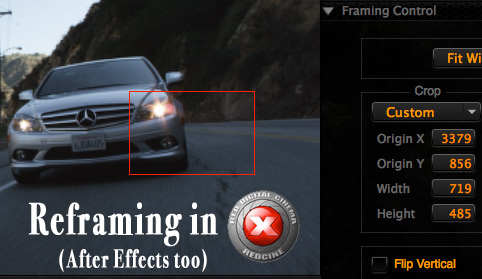
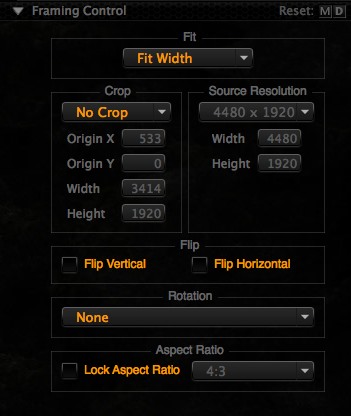
It would seem that reframing in the new Redcine-X would be a simple operation since there exists a Framing Control tab:
image

And you would be right as it’s not that hard to use but for some reason I remember trying to get it to work many builds ago and I couldn’t figure out how to crop in on a 4K image and then re-render a 1920x1080 ProRes file for the edit. And apparently from this Reduser post I wasn’t the only one.

It could have been a bug in that Redcine-X build or it could have been (and very likely was) operator error. If you remember the original Redcine (and let’s be honest, many of us would like to forget it) one nice thing that it had was the ability to reframe a shot and see exactly what you were getting. You could load a 4K shot and then tell Redcine to display that shot in a 1920x1080 (or whatever resolution you wanted, SD anyone?) frame. That would show the exact detail and sharpness to expect. X and Y coordinates then allowed the user to adjust the picture to get exactly what you wanted in the frame. Export that clip and you had a nicely reframed shot.

Redcine-X did away with that particular method but here’s how to make it work.

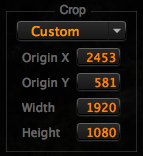
I tend to want to reframe one shot at a time so I load the clip I want to work on into the Redcine-X Viewer. Then I go to the Framing Control tab under the Clip Settings menu. Since I’m usually reframing 4K for 1920x1080 delivery I set a custom crop:

image

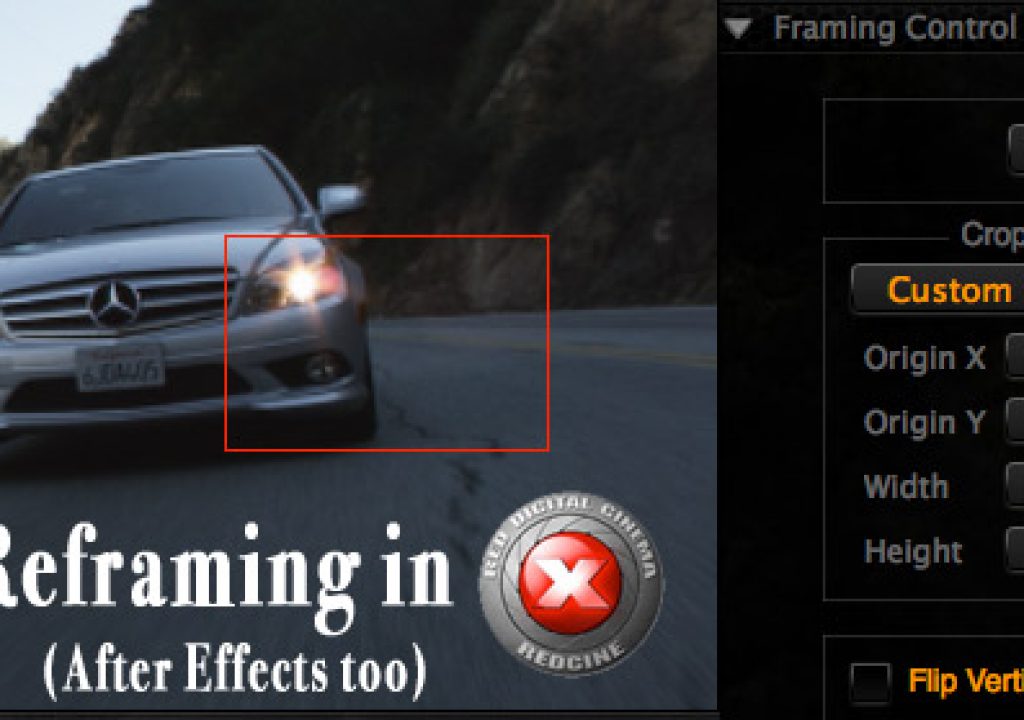
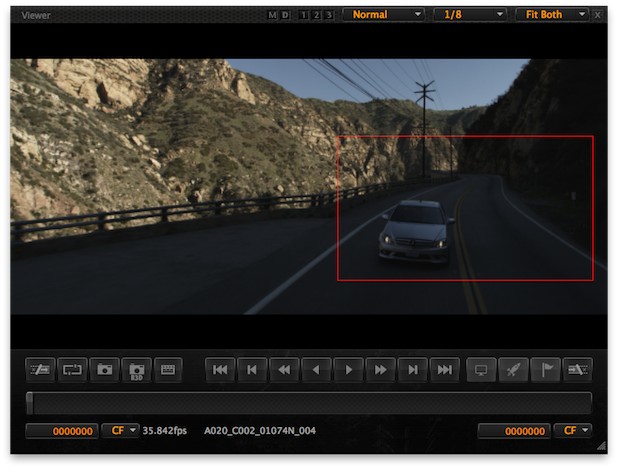
This sets the framing to 1920x1080. You can see the results by the red framing box frame that pops up in the Viewer:
image

From there it’s a matter of moving the frame to create the new shot. You can use the Origin X and Y numbers in the Framing Control tab but a much easier way is to hold down the Command key on the keyboard and move the red framing box with the mouse.

With that you can get some really nicely reframed shots:


One of the original RED MX sensor clips scaled from the original size down to a web-friendly format.


The same shot but cropped in Redcine-X to get a close to the car as possible in a 1920x1080 frame.

Another option I’ve used for reframing a 4K RED shot is After Effects.  If you’re using CS5 then there’s native support for RED right out of the box. If using CS4 then a download of the RED ADOBE CS4 INSTALLER (BETA) is needed. According to RED this installer “Provides native REDCODE media (R3D) support for Premiere Pro CS4 (4.1 and later) and After Effects CS4 (9.0.2 and later). “ I haven’t tried reframing in Premiere Pro CS5 but presumably it should work too.

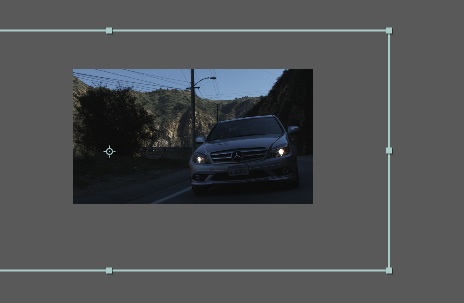
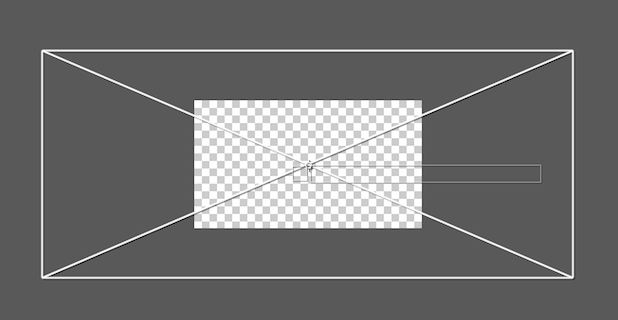
After Effects works in much the same way that the old Redcine did so it’s a great way see exactly what you’re getting. Make a new composition with the appropriate resolution and import the R3D file into your AE project. Then when you drag the R3D file into the composition window you can see exactly the frame size different between the 4K (or 2 or 3K) image and the HD frame. Scale and frame accordingly, export a new file and you’ve got a new, reframed shot.
image

You can see the frame size difference when dragging a 4K R3D into a 1920x1080 composition in After Effects.

image

With this method you can see exactly what you’ll get in the frame.

One cool thing about doing something like this in After Effects is that you can keyframe moves around the image and create interesting effects:


I faked a snap zoom into this shot be keyframing the scale parameter (hit play if you’re seeing a white frame).

There’s certainly a lot of hooopla these days about the HDSLRs (and I have often drunk that Kool-Aid recommending and owning a 7D) but this reframing ability is one of the many reasons I still love working with RED footage. Try that kind of reframing with HDSLR footage ... it ain’t gonna happen. Oh and there’s all that grading latitude in the raw R3Ds as well.

(Page 1 of 1 pages for this article )

                    Clip to Evernote


10 Final Cut Pro things FCP editors might be missing in Adobe Premiere Pro CS6

Scott Simmons | 05/11

These are a few of the things that I found myself searching for as I’ve been moving over to Premiere Pro CS6 as a FCP 7 replacement

image

Adobe is making a big play for Final Cut Pro users with their CS6 release of Premiere Pro. It’s vastly improved over the Premiere Pro of old and is a lot like Final…

After Effects Apprentice Free Video: Working with Nested 3D Compositions

Chris and Trish Meyer | 05/07

How you can be two places at once inside After Effects

As we mentioned awhile back, we’ve been busy the past year and a half creating an extensive, multi-course video training…

NAB 2012: RED

Adam Wilt | 05/07

RED’s Ted Schilowitz discusses 2012’s products, and a photo gallery.

RED’s “Leader of the Rebellion” Ted Schilowitz held a press conference at NAB on Monday, describing the projects and products RED is working on. Rather than paraphrase him, I’ve got him on card (well, it’s not “on…


You must be registered to comment. This is an effort to reduce spam. Please REGISTER HERE.

Name:

Email:

Location:

URL:

Smileys

Remember my personal information

Notify me of follow-up comments?

Submit the word you see below:


Final Cut Pro X Multicam Editing webinar now available on-demand
10 Final Cut Pro things FCP editors might be missing in Adobe Premiere Pro CS6
A collection of Avid Media Composer related links for my NAB Migrating to Avid class
An elegant iPhone timecode calculator
Random notes from my first “real world” Adobe Premiere Pro CS6 edit
NAB 2012: SpectraCal
NAB 2012: Apple and Final Cut Pro X
NAB 2012: Lightworks
NAB 2012: Baselight for Avid Media Composer
NAB 2012: Quantel new Pablo and Neo Nano
NAB 2012: Promise Technology’s portable Thunderbolt J4 and J2
NAB 2012: NewBlueFX Titler Pro
NAB 2012: PluralEyes 3.0 from Singular Software
NAB 2012: Technicolor CineLights from the GoPro booth
Autodesk Smoke 2013: it really changed for the better
My top 5 (or so) Adobe Premiere Pro CS6 features
How to preview Avid Media Composer’s MXF files for free without Media Composer
My NAB 2012 Post|Production World classes
Baselight for Final Cut Pro is one of the most powerful legacy FCP grading plugins ever
ARRI’s DNxHD Alexa update, Sorenson Squeeze Pro and OP this, OP that
What’s happening at NAB 2012?
The C300 short Hustle and some before and after images
Tip Tuesday: Disable a clip in the Avid Media Composer timeline
Testing the 7toX Final Cut Pro 7 to Final Cut Pro X conversion
Q and A with Bunim/Murray’s Mark Raudonis about their recent Avid switch
Kicking the tires on the Final Cut Pro X 10.0.3 Multicam update
Update Alert: Final Cut Pro X goes to 10.0.3
Adobe teases Prelude at the San Francisco Supermeet, FCPUG changes its name
Tangent Element panels are now shipping
Avid Media Composer 6 review online


10 Final Cut Pro things FCP editors might be missing in Adobe Premiere Pro CS6

Scott Simmons | 05/11

These are a few of the things that I found myself searching for as I’ve been moving over to Premiere Pro CS6 as a FCP 7 replacement

image

Adobe is making a big play for Final Cut Pro users with their CS6 release of Premiere Pro. It’s vastly improved over the Premiere Pro of old and is a lot like Final…

After Effects Apprentice Free Video: Working with Nested 3D Compositions

Chris and Trish Meyer | 05/07

How you can be two places at once inside After Effects

As we mentioned awhile back, we’ve been busy the past year and a half creating an extensive, multi-course video training…

NAB 2012: RED

Adam Wilt | 05/07

RED’s Ted Schilowitz discusses 2012’s products, and a photo gallery.

RED’s “Leader of the Rebellion” Ted Schilowitz held a press conference at NAB on Monday, describing the projects and products RED is working on. Rather than paraphrase him, I’ve got him on card (well, it’s not “on…

Expression Shorts - loop

David Torno | 05/06

Learn how the loop expressions work.

image

Looping is a very common task in our industry and is mostly associated with video footage of some…

To be considered for listing, contact pr (at) provideocoalition (dot) com


Copyright © 2012, HD Expo, LLC a division of Diversified Business Communications. DBA Createasphere

All rights reserved. HD EXPO, High Def EXPO, Createasphere, E-Tech, Entertainment Technology Exposition, 3D Production Workshop, VariCamp, P2 Camp, ColorCamp 101, and Lighting, Filters & Gels for HD are all trademarks of HD Expo, LLC.

Terms of Use  |  Privacy Policy

Check PageRank