

Filmtools
Filmmakers go-to destination for pre-production, production & post production equipment!
Shop Now
There are a ton of resources on lower thirds. Here’s a sampling…
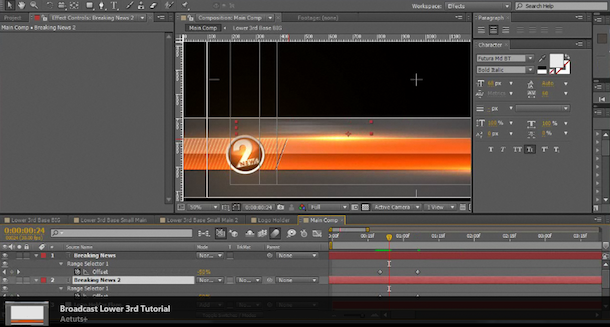
There are a ton of resources on lower thirds. Here’s a sampling of some free — and less free — templates, downloads, and tutorials that help leverage or create them in After Effects, Photoshop, and Premiere — and some to automate their production.
In Design Your Own Broadcast Lower Thirds at AEtuts+, Stefan Surmabojov uses simple built-in tools like masks, gradients, shadows and bevels in After Effects to create a broadcast quality lower third design.
Where are Premiere CC and CS6 lower thirds templates? See Library, title templates, template projects missing: Premiere Pro, After Effects, Encore and Creating and editing titles and Rolling and crawling titles in Premiere Help.
Premiere Pro Title Collection by Jarle Leirpoll was released for free in November 2013. You get 3 Lower Thirds templates, an End Credit template, a collection of special characters that you can copy/paste into other titles, and more.
![Free Lower Thirds, and Related Titling Resources [updated] 9](https://www.provideocoalition.com/wp-content/uploads/newst-9030275.jpg "Free Lower Thirds, and Related Titling Resources [updated] 13") If you don’t like the free templates that come with your NLE — built-in Premiere and After Effects templates are very stale at this point — these might come in handy… Video Copilot has some free templates for TV news-style lower thirds in Free News Templates. Also, a ton of low-cost templates now pop up on Google searches — so many that there are also many free templates to attract customers.
If you don’t like the free templates that come with your NLE — built-in Premiere and After Effects templates are very stale at this point — these might come in handy… Video Copilot has some free templates for TV news-style lower thirds in Free News Templates. Also, a ton of low-cost templates now pop up on Google searches — so many that there are also many free templates to attract customers.![Free Lower Thirds, and Related Titling Resources [updated] 10](https://www.provideocoalition.com/wp-content/uploads/content-uploads/aepp_5_GradEditor.jpg "Free Lower Thirds, and Related Titling Resources [updated] 14")
In After Effects CC and later, Adobe added the ability to use text templates from After Effects in Premiere Pro.
Awhile back, Lynda.com released Premiere Pro and After Effects: Creating Title Graphics with Chris Meyer and Trish Meyer, which “covers building and modifying text animation presets, using shape layers to create graphic elements, and establishing dynamic connections between After Effects and Premiere Pro using the Dynamic Link feature. The course also includes design and workflow suggestions.” You can find the same short course on PVC, in Using After Effects as an Advanced Titler for Premiere Pro.
![Free Lower Thirds, and Related Titling Resources [updated] 11](https://www.provideocoalition.com/wp-content/uploads/lower_thirds-4606610.jpg "Free Lower Thirds, and Related Titling Resources [updated] 15") Earlier, Artbeats provided an After Effects tutorial video, Lower Thirds in Half the Time by Steve Holmes, and Ninja Crayon had a funny take on a newish Artbeats collection in Artbeats Lower Thirds?
Earlier, Artbeats provided an After Effects tutorial video, Lower Thirds in Half the Time by Steve Holmes, and Ninja Crayon had a funny take on a newish Artbeats collection in Artbeats Lower Thirds?
There were several more tutorials on lower thirds on Adobe TV, one from Motionworks, Transparent Graphics in After Effects from Post Fifth Pictures, and relevant stuff by Alan Shisko in Making It Look Great 2 and Edgy Glints.
There a bunch of newer tutorials of variable quality for various skills levels. At the most basic level you can animate a Photoshop file on with the Push Transition, or you can try something more interesting like Video School Online in Minimalist Lower Third After Effects Tutorial:
Here are a few more related tutorials…
Stjepan Alaupovic at StreamingMedia shows how to use shape layers to create, customize, and animate lower-third graphics with Adobe After Effects CC 2015.
In Self Resizing Lower 3rds – Adobe After Effects tutorial, Evean Abrams showed you how to “create lower 3rds that change their size depending on how long the text is.”
There’s even an After Effects script, Lower Thirds Composer v1.0 (released in January 2016), which automates lower thirds creation based on 44 templates.
![Free Lower Thirds, and Related Titling Resources [updated] 12](https://www.provideocoalition.com/wp-content/uploads/thirdthumb19-9045732.jpg "Free Lower Thirds, and Related Titling Resources [updated] 16") To generate things in mass, Adam Everett Miller has a workflow tutorial on AEtuts, Enough Lower Thirds To Feed A Small Country, which uses the well-documented CompsfromSpreadsheet script by Mike Cardeiro from AE Scripts. Later, David Torno posted Expression Shorts – Read External Text Document AE Text Layer source text from external document (video).
To generate things in mass, Adam Everett Miller has a workflow tutorial on AEtuts, Enough Lower Thirds To Feed A Small Country, which uses the well-documented CompsfromSpreadsheet script by Mike Cardeiro from AE Scripts. Later, David Torno posted Expression Shorts – Read External Text Document AE Text Layer source text from external document (video).
Previous to the CompsfromSpreadsheet script, Dale Bradshaw developed a script (CSV to Text Layers) posted at his blog Creative Workflow Hacks in How to use a spreadsheet to generate Lower Thirds, Slates, Titles, etc. in After Effects. It was later updated for CS5.
Also, Harry Frank and others developed expressions for similar tasks; see Expressions and External Documents and Expressions and External Documents – Revised for CS4. These posts generated a good amount of use and follow-ups in their comments; also Lloyd Alvarez commented on a review by Ryan Ragle:
“While expressions are great because they are constantly dynamic, one of the downfalls of using them is that they need to be evaluated every frame in time which can become an exponential rendering problem when you have many layers with many expressions on each one. This particular problem of versioning I think is better solved with a script which only needs to be evaluated once at run-time.”
See also the Spreadsheets to Lower Thirds in Premiere and After Effects mini-roundup.
See too A CSV Text Data Plugin for FCPX/Motion 5 for “a small plugin for FCPX/Motion 5 that will allow you to import a CSV file to create text plates for things like slates, lower thirds, and titles. FCPX continues to be a work in progress and I have the same reaction as most people. Seems powerful, but where’s x, y, and z? In the short term we seem to have lost a lot of data in xml transfers so I was looking for a way to populate slates in my projects without a lot of typing and this seemed to fit the bill. This is the first public release so don’t use it in sensitive production projects until the plugin is battle tested because the project format for arbitrary data seems somewhat fragile and it seems easier to corrupt FCPX project files…”
For some additional fun, see How to update multiple titles in Premiere Pro using InDesign from Paul Murphy (December 2013),