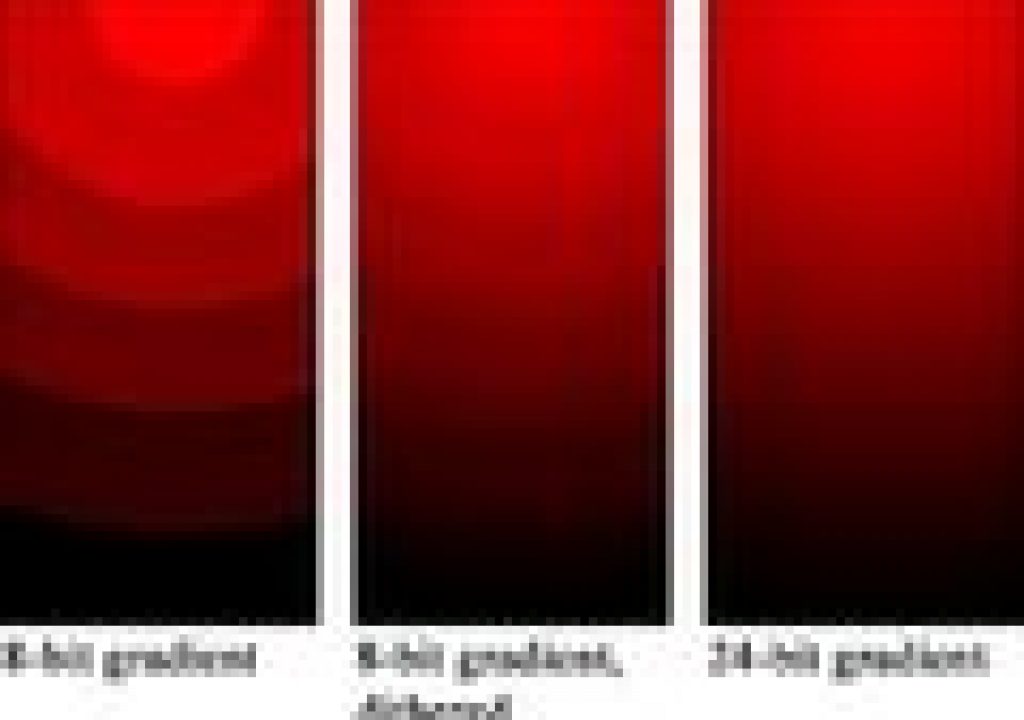

 It’s a bit of a mystery why there’s still so much banding in TV & web graphics, but less mystery for for web video.
Maybe people can’t preview in the appropriate color space or codec to see banding, which often can be eliminated by adding the Noise filter in After Effects or Premiere (or Add Grain in AE), at maybe a 1-5% setting. This solution should work in any application with a video noise filter.
The stuff on cable systems is subject to God knows what compression and recompression, so being conservative with gradients may be the better part of valor. If you’re using the Ramp plug-in, increasing Ramp Scatter may help. If the natural quadratic falloff of the Optical Flares has schmutz, Andrew Kramer says you can add contrast, to clip the subtle light falloff away from the center. And it might be good to avoid solid color (which become gradients after lights hit them) on backgrounds if your video is intended for the web. A touch of complexity, low detail avoiding busy backgrounds, will reduce color artifacts on heavier encodes.
Oddly enough, many of the YouTube tutorials explaining how to eliminate banding actually have banding, which is often revealed after export compression then recompression by the streaming service. After Effects Help has additional tips, which reinforces thinking about delivery codecs,
“Even if you’re using 8-bpc footage and are creating movies in 8-bpc formats, you can obtain better results by having the project color depth set to 16 bpc or 32 bpc. Working in a higher bit depth provides higher precision for calculations and greatly reduces quantization artifacts, such as banding in gradients.
Note: Merely increasing the color depth within a project won’t eliminate gradients if the output format has a low bit depth. To mitigate banding, After Effects introduces dithering of colors when the colors are converted to 8-bpc colors, including when rendering and exporting to an 8-bpc format. This dithering is not introduced for previews. To force dithering for previews, apply an 8-bpc effect that does nothing-such as the Arithmetic effect with the default values-to an adjustment layer.”
For additional perspective and details on some codecs, see Color Bit Depth by JD Vandenberghe on PVC, and Adobe After Effects CS5: Colors, Channels, and Color Bit Depth from Todd Kopriva and Video2brain:
For Premiere, bit depth is handled by enabling Maximum Bit Depth in Sequence Settings or the Export dialog. This maximizes the color bit depth, up to 32 bpc, to include in video played back in sequence, or exported, but may not be available if the your codec provides only one option for bit depth. You also have to use higher bit-depth effects, which can be sorted for automatically in the Effects panel. Also useful are Karl Soule’s explanations in Understanding Color Processing: 8-bit, 10-bit, 32-bit, and more on his blog.
Several workarounds (creating gradients, TV vs. web) were discussed by Greyscale Gorilla in his handy 2009 survey, How to Remove Banding Artifacts in After Effects. Note the light gray UI of 2009 compared to the more common dark UI of later years. And that was toned down from the blinding white UI of the 1990s!
Banding can be a problem for 3D scenes too. Advice in this area can be found in After Effects Natural Light Effects by Chris Meyer and Trish Meyer, which tackles “volumetric lighting effects, such as light rays and glows, [which] are susceptible to two common problems: They can look too synthetic, and they are prone to banding when compressed for DVDs and the web. …Chris Meyer shows how to make light look more realistic by adding dust or swirling smoke, creating natural imperfections that help with compression. He demonstrates how to do this using stock footage of this natural phenomenon or the After Effects Fractal Noise and Turbulent Noise effects.”
Even when there’s just a final render, you may still be able to fix banding issues with plug-ins like Magic Bullet DeNoiser, Neat Video or similar, Film Convert Pro 2, AE Remove Grain, or a Channel Blur or the like. Here’s a tutorial on removing banding with Deband from GenArts Sapphire for After Effects:


Filmtools
Filmmakers go-to destination for pre-production, production & post production equipment!
Shop Now